Foundation-Model Vision · VisionAgent / Field Deployment
Pharmaceutical PPE Compliance Monitoring
One camera, four items of PPE, one verdict per pass — the system tells the worker what is still missing before they reach the door, without enforcing an order.
KEY POINTS
- The core tension. This corridor does not need "done in a fixed order", it needs "nothing missing at the door". Hard-enforcing an order gets people turned back repeatedly, and the system gets bypassed.
- Strictness is a configuration choice. An ordering state machine was deliberately left out in favor of a checklist completable in any order; the same capability, orchestrated differently, supports plants that do require a fixed order.
- Round latching is the key move. Each of the four PPE items feeds in through its own reference and stays true once triggered within the round, so gloves finishing before the coverall does not affect the result, nor does a sleeve later occluding the view.
- The state machine is down to three circles. With order handled in the event layer, the state machine only manages the start, end and reset of a pass — that is the complexity saved.
- Few-shot start. 8 field frames and 4 classes for the whole project; adding an item means a few more frames plus one more checklist cell, with no retraining.
The site is a long narrow gowning corridor with an overhead camera already installed at the entrance. The requirement: without changing the corridor layout and without adding wearable sensors, determine whether four items of PPE are correctly worn before the person enters the work area, and give the verdict to that person on the spot.
01/6REQUIREMENTS
First work out what actually needs to be enforced
Gowning scenarios are easily assumed to be forced-order problems — the previous cleanroom project was exactly that. But the acceptance criterion for this corridor is a single sentence: when entering the work area, the hair cover, mask, coverall and gloves are all on.
Whether gloves go on before or after the coverall is of no interest here. Enforce a fixed order anyway and people get turned back to redo steps, and the system is quickly worked around — a constraint in the wrong place is worse than no constraint.
So an ordering state machine was deliberately left out in favor of a checklist that can be completed in any order, with two motions bounding the process: opening the door starts the pass and showing both hands closes it. Strictness is configured, not baked into the model — which is what lets one capability serve both relaxed and strict plants.
MEASUREDOne complete gowning pass
The table below was read second by second off the panel in the recording above; these are not illustrative values. Note the row at 1:17: gloves are already marked done while the coverall is still pending — out-of-order completion really does happen on site, and the system absorbed it.
| Time | Panel change | Note |
|---|---|---|
| 0:05 | Start (door handle) → done | The handle is outlined on its own; the pass starts timing |
| 0:25 | Hair cover, mask → done | Upper body just changed; both settle one after the other |
| 1:17 | Gloves → done | The coverall is still pending; the order is allowed to invert |
| 1:46 | Coverall → done | All four present; only the closing item remains |
| 1:47 | End (both hands) → done | Green banner: PPE compliant, you may enter the work area |
| 1:50 | All six cells reset to pending | Ready for the next person, no manual intervention |
| Site constraint | How the system satisfies it |
|---|---|
| A single overhead camera for the whole pass | Connects to the existing CCTV and reuses it |
| The verdict must arrive before the door | Local real-time inference; the panel and banner refresh on the spot |
| Raw video must not leave the plant | Inference on a local edge device; only verdicts and evidence go out |
| Workers receive no training | A six-cell checklist and one clearance line; the colors say what is missing |
| PPE requirements will grow | Adding an item = a few field frames + one more checklist cell, no retraining |
SCOPEWriting down what it can and cannot do, on day one
CAN DO
- Whether hair cover / mask / coverall / gloves are worn
- Whether all four are present before entering the work area
- Start, end and duration of a gowning pass
- Entering before the set is complete
PARTLY
- Whether the mask covers properly: needs a face close-up camera
- Whether both hands are gloved: the overhead view lets them occlude each other
EXPLICITLY NOT
- Whether zippers and cuffs are fastened tight
- Masks worn inside out, or reused after falling on the floor
- Expiry dates on cleanroom garments
- A fixed step order (not required here, so not enabled)
02/6TENSOR FLOW
Six operators wired into one flow on a canvas
The backbone of the whole configuration is a single tensor flow canvas. The engineer drags operators out of the library on the left, wires them in the direction the data travels, and fills in parameters inside each node — not a line of code. Look at the complete flow first; the next three sections are all about what happens after you double-click one of these nodes.
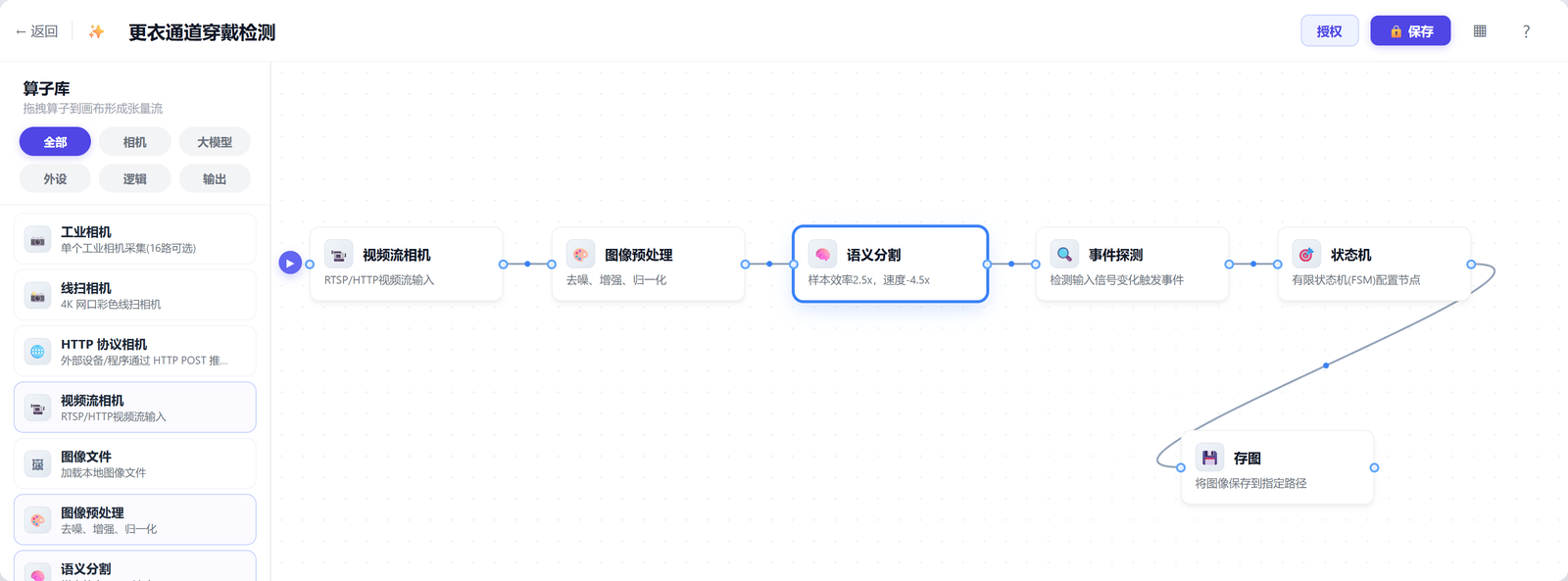
| Operator | What you configure | Why it is its own layer |
|---|---|---|
| Video stream camera | RTSP / HTTP stream address, camera position | Reuses existing CCTV; video circulates locally only |
| Image preprocessing | Denoise, enhance, normalize | Lighting differs sharply inside and outside the corridor; flatten it first |
| Semantic segmentation | Minimum area per class, detection confidence, debounce frames | "Seeing" is trained only here, starting from 1–10 field frames per class |
| Event detection | The decision logic for E0–E5 | Translates outlines into business language; pure configuration |
| State machine | Start, end and reset of a round | Only owns the boundary of one pass — the cheapest place to change |
| Frame capture | Trigger timing, save path | Leaves reviewable key frames; stays out of the control loop |
Add a PPE item (shoe covers, say): add a class row and a few field frames in the segmentation node, add one event and one reference in event detection; the state machine is untouched. Switch to a forced order: change only the state machine, leaving the detection layer and the model alone. Move to another corridor: copy the whole flow and keep the classes.
03/6SEGMENTATION
Teaching the system to see the PPE items
Why pixel-level outlines rather than bounding boxes: the corridor is long and narrow, and people standing sideways, bending over or half-dressed is the norm; the coverall and the wall are both pale, and a gloved hand has a similar outline to a bare one. A box alone cannot tell whether the item is in the place it should be. An outline gives shape and position, which is what the decision layer needs.
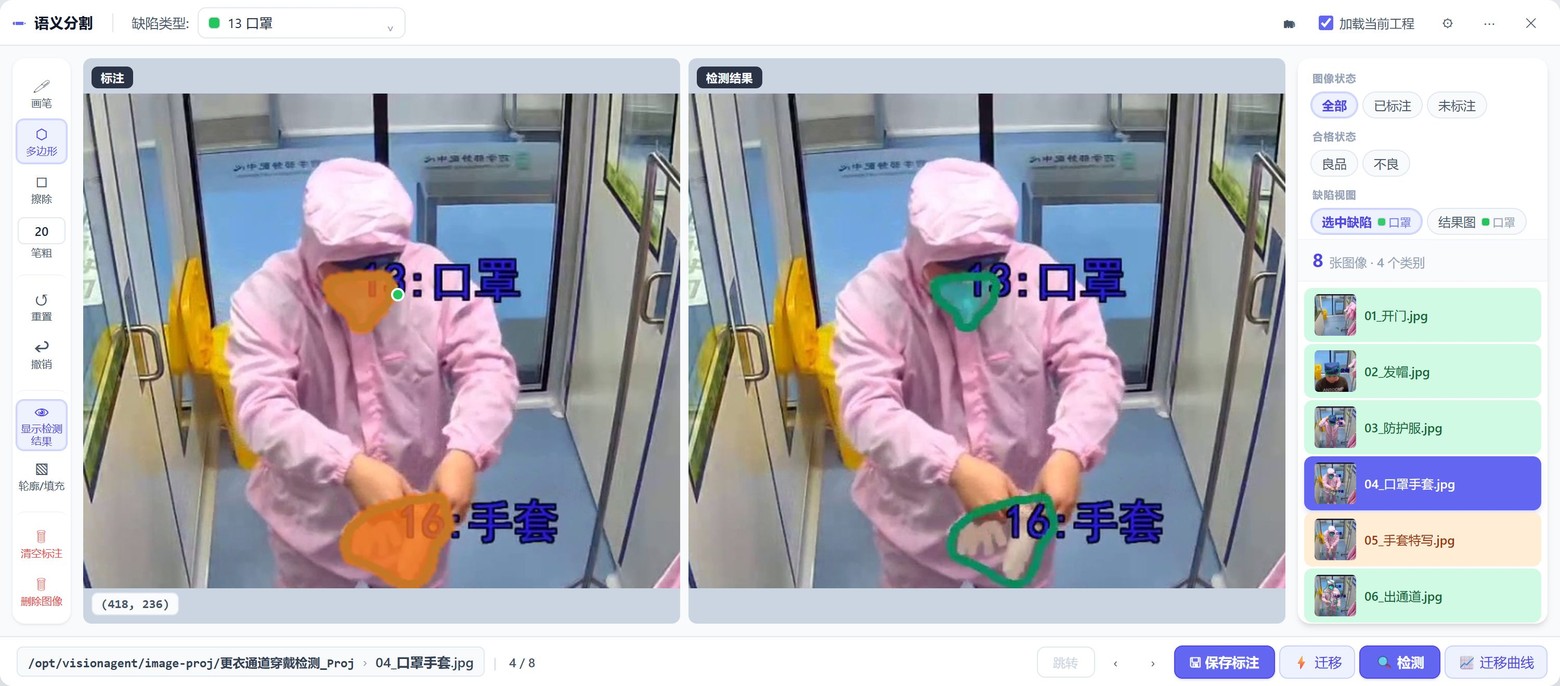
| Id | Class | Role in the flow | Difficulty |
|---|---|---|---|
| 1 | Start (door opening) | Start of the pass; triggers timing | The handle is thin and reflective; needs an outline, not a box |
| 12 | Hair cap | First checklist item | Low contrast against dark hair, small visible area from above |
| 13 | Mask | Its own checklist item | Small visible area in profile; area threshold loosened |
| 16 | Gloves | Its own checklist item | Similar outline to a bare hand; shape changes a lot while being put on |
The panel says "hair cover" while the detection class is called "hair cap". That is not a typo — the checklist item belongs to the business vocabulary, the detection class to the model's, and the decision layer maps between them. Renaming, merging two classes into one acceptance item, or splitting one item into two separately judged classes are all configuration changes.
04/6EVENT LOGIC
How "any order passes" is actually configured
Segmentation only sees pixels; the business needs decidable events like "the hair cover is on" or "clear to enter". That logic is assembled in the event orchestrator: drag decision primitives out of the library, pick the target class in the node properties, then combine them with AND / OR / NOT into a condition.
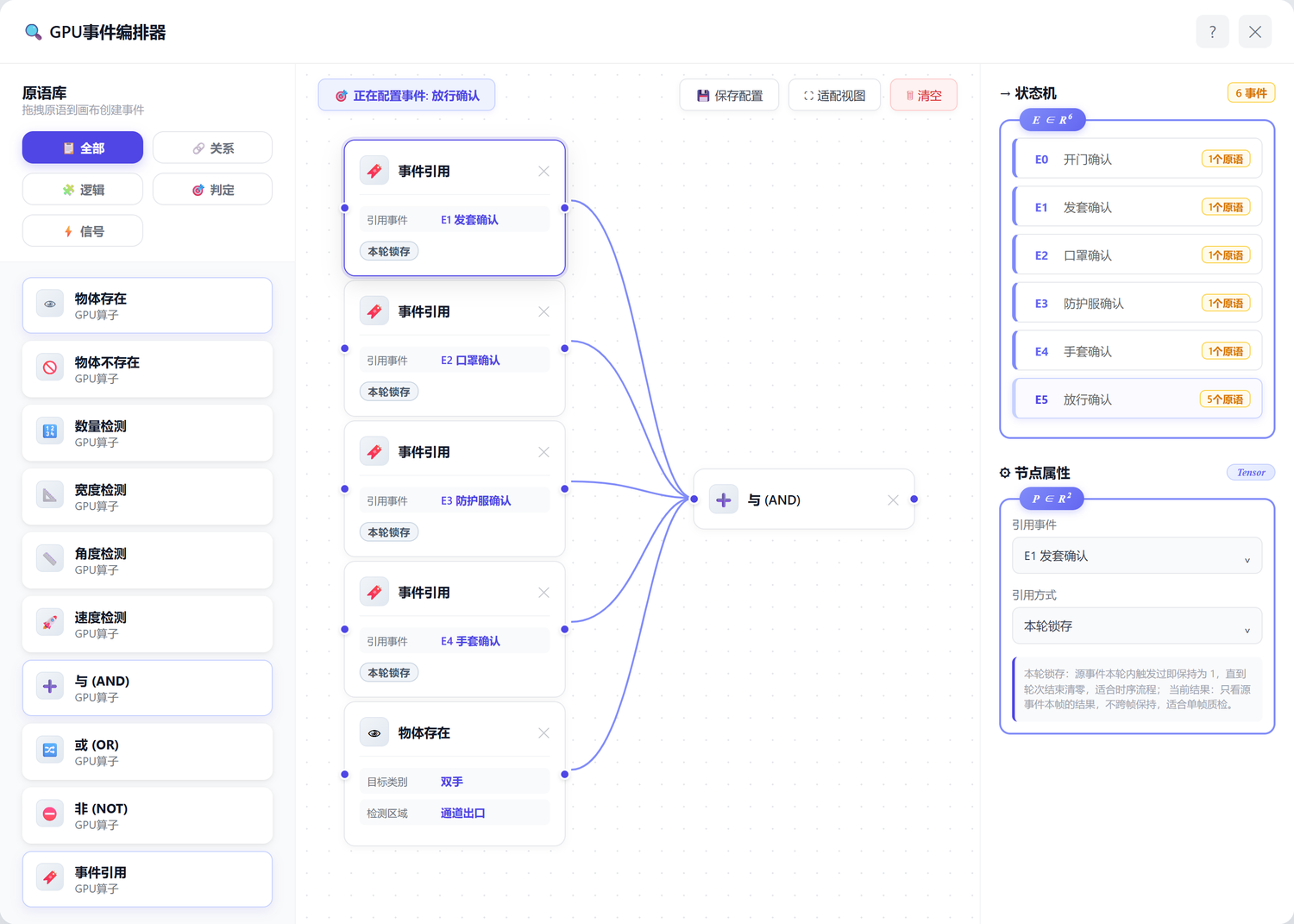
| Primitive | How it is configured | Where this project uses it |
|---|---|---|
| Object present | Target class (multi-select) + detection region | E0–E4: door, hair cover, mask, coverall, gloves; "both hands" in E5 |
| Event reference | Referenced event + mode (round latching / current result) | E5: one reference per PPE item, all set to round latching |
| AND / OR / NOT | Wire several primitives together | E5: all five conditions must hold before clearance |
| Object absent | Exactly one class; fires when it is missing | Backward moves such as removing the mask midway; not enabled |
| Count check | Comparison mode + threshold | One glove per hand; the overhead view occludes them, so not enabled |
The easy mistake: minimum area, detection confidence and debounce frames are parameters of the segmentation node, not of the event. The tuning order must be to stabilize segmentation first and only then touch event wiring and reference modes — adding conditions in the event layer while segmentation is unstable is paying the model's debt with logic, and it only gets messier.
05/6ROUND BOUNDARY
The state machine is down to three circles
The event layer has already collapsed the four PPE items into a single "clearance confirmed", which leaves one question: when does this pass start, when does it end, and when does it reset. That goes to the state machine. It is the thinnest layer in the whole configuration — thin enough to be three circles, and that thinness is exactly the complexity saved by giving order to the event layer.
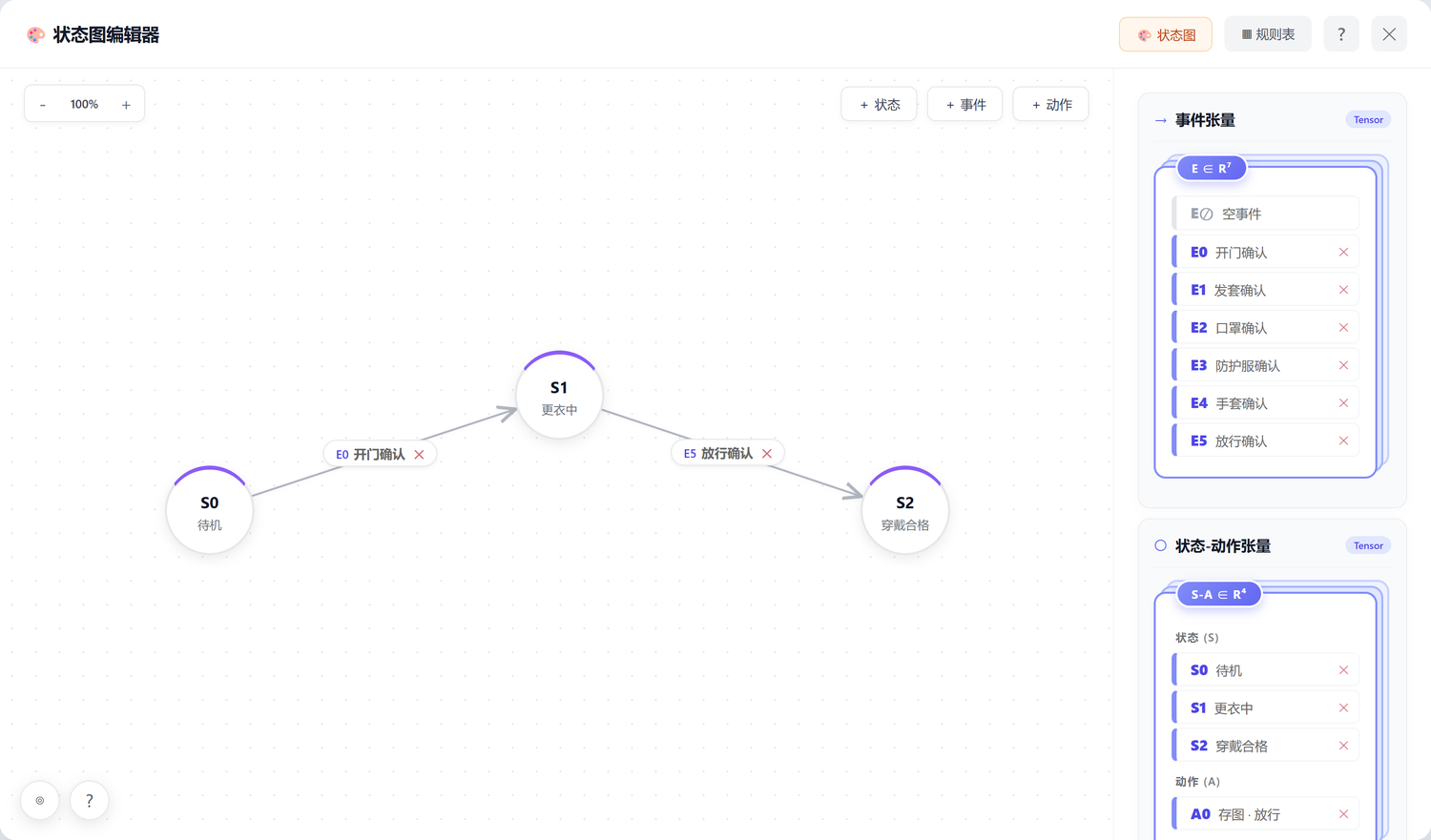
E0 door opened opens a round and E5 clearance confirmed closes it.
Not one of the four PPE items appears on this diagram: they were already absorbed by round latching
in the event layer. Returning to S0 is not an edge either — the state machine node's reset port
clears at the end of a round, which is what you see at 1:50 in the recording when the six cells reset. The
state-action tensor panel on the right lists the three states plus the single action A0 save frame ·
clear, bound to S2.
| State | Entered by | What happens here | Left by |
|---|---|---|---|
| S0 Standby | System start, or reset after the previous round | Waits for one signal only: the door being pulled open | E0 Door opened |
| S1 Gowning | E0 Door opened | Each PPE item latches; the panel turns green cell by cell | E5 Clearance confirmed |
| S2 PPE compliant | E5 Clearance confirmed | Fires A0 to save a frame and issues the clearance verdict | Reset port clears, back to S0 |
There is little to tune in the three states themselves. What genuinely has to be agreed with the plant is what counts as the start and the end of a pass. This project chose the door opening and hands leaving the corridor, for a practical reason: both are stable, singular visual events that do not recur midway, and only with such anchors is the measured duration of each pass comparable. If the door is usually left open, or several people enter at once, the start has to become a different anchor — such as standing still in a marked zone — and what changes is the decision logic of that one event, E0; the state diagram stays.
06/6ROLLOUT
What IT has to prepare is a one-time checklist
None of this involves rebuilding the production network. For the customer's IT team the deployment is a one-time cooperation; maintenance afterwards lives in the configuration UI on the business side.
| Item | Detail | Owner |
|---|---|---|
| Camera stream address and a read-only account | Stream address per camera position; read-only is enough | Customer IT |
| Edge server | GPU-equipped, in a cabinet the video can reach | Customer procurement, or supplied by us |
| On-site display | A screen in the corridor showing the checklist and clearance prompt | Customer provides location and power |
| Network policy | Pull video, push verdicts; no internet access needed | Customer IT |
| Door interlock (optional) | The clearance signal is offered side-channel, not in the control loop | Agreed by both sides |
| Storage and backup | Evidence retention period, configuration backup policy | Agreed by both sides |
One edge agent can carry several camera feeds and several tensor flows at once: multiple gowning corridors, airlocks and different workshops share one device and one configuration UI. Adding a station mostly means adding a camera, copying the flow and contributing a few field frames.
07TAKEAWAYS
Strictness should be a configuration option
What stayed with me on this project is "do not nail down the order". The previous cleanroom project required six steps with none out of sequence; this corridor only requires nothing missing at the door. Same activity, very different strictness.
Both projects run on the same pieces: the same semantic segmentation, the same event orchestrator, the same state machine node. The difference is only in how they are orchestrated. The cleanroom hangs events one by one on state machine transitions, so a skipped step does not advance; this corridor merges events through round latching into a single "clearance confirmed", so any order works. The detection layer is identical.
Whether that difference can be a configuration option rather than a rebuild is how I judge a vision platform. A system survives only if the people on site can change it.
The other lesson is who the verdict is for. This project puts it directly in front of the worker: whichever cell is not green tells them what is missing, with no need to wait for a supervisor to review. The constraint bites only where it has to and creates no pointless stops — and only a system people are willing to use produces real data.
Leo
PhD in computer vision · VisionAgent solutions and delivery
PhD in computer vision, researching few-shot segmentation and video behavior understanding; 12 years of hands-on industrial vision experience across 30+ production lines and 100+ stations.
Currently focused on edge GPU inference optimization, cross-domain generalization and closing the data loop on site — making one way of configuring a system reproducible across different plants and different processes. This article records the actual configuration, decision logic and field results of the gowning corridor PPE compliance project.