What this covers
- Packing is the last manual step before the product ships. Once the carton is sealed, what went in is no longer visible — why the check has to happen at the moment of packing.
- How the station is split into 6 segmentation classes so an NG record can name the missing item instead of just saying "incomplete".
- How 7 events turn "seen" into "actually placed", filtering out material that merely passes through the frame.
- How one state diagram expresses both the checklist and the physical constraint that bagging must precede placement — a model change is a diagram edit, not a code change.
- 1–10 sample images per class, minutes to configure, one edge box running several workflows.
What the station looks like
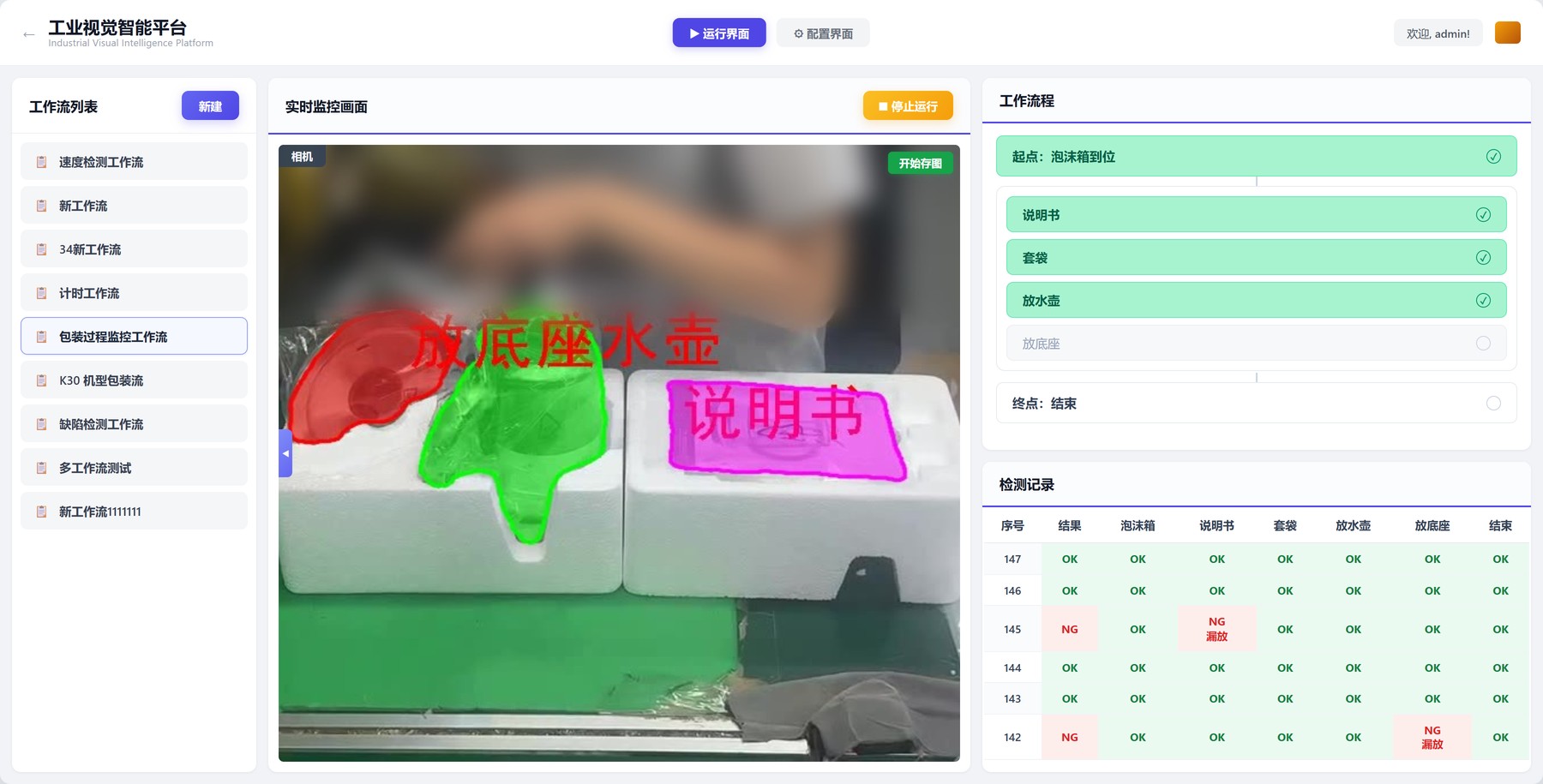
SceneThe station sits at the end of the packing line. Two foam inserts are placed on the belt — one with the kettle cavity, one with cavities for the manual and accessories. The operator puts the manual into the right-hand cavity, slips a plastic bag over the kettle, sets the bagged kettle into the left cavity, adds the base, then lays the film over the top and the unit moves on to the case sealer.
The problem: once it is sealed, you cannot check it
ProblemThe packing itself is not hard. What is hard is that a missing item leaves no trace on the floor.
A missing manual becomes a complaint and a re-ship once the customer opens the box. A missing base means the unit cannot be assembled at all — a full carton comes back, plus freight and re-packing labour. All of that cost lands outside the factory, while the two seconds that produced it looked exactly like a good unit.
The usual fallback is weighing the carton. The magnitudes do not work: the carton weighs kilograms and a manual weighs tens of grams, well inside the natural variation of the foam and cardboard themselves. Even when a difference does show up, all it says is "lighter than expected" — not which item is missing, so the carton still has to be opened.
So the judgement has to happen at the moment of packing, and the verdict has to be specific: not "something is wrong with this carton", but "this carton is missing a manual".
That hands the problem to vision — and packing materials are exactly what traditional AOI handles worst. White foam sits on white foam, the bag is transparent, and most of the manual is tucked into a cavity with only a corner showing. Irregular shapes, edges defined by reflection, foreground the same colour as background: template matching cannot frame them and fixed thresholds cannot separate them. On top of that, appliance models change often — each model has its own foam and its own checklist, so a template built today is obsolete in a few weeks.
We solve this layer with few-shot semantic segmentation: instead of drawing a box around the object, trace its outline. Each class starts from 1–10 sample images and runs within minutes of labelling. A new model does not need a retrained network — it needs a few more images.
Tensor flow: seven operators wired into one pipeline
PipelineThe logic is not written, it is wired. The operator library is on the left; drag onto the canvas and connect, and that is the pipeline.
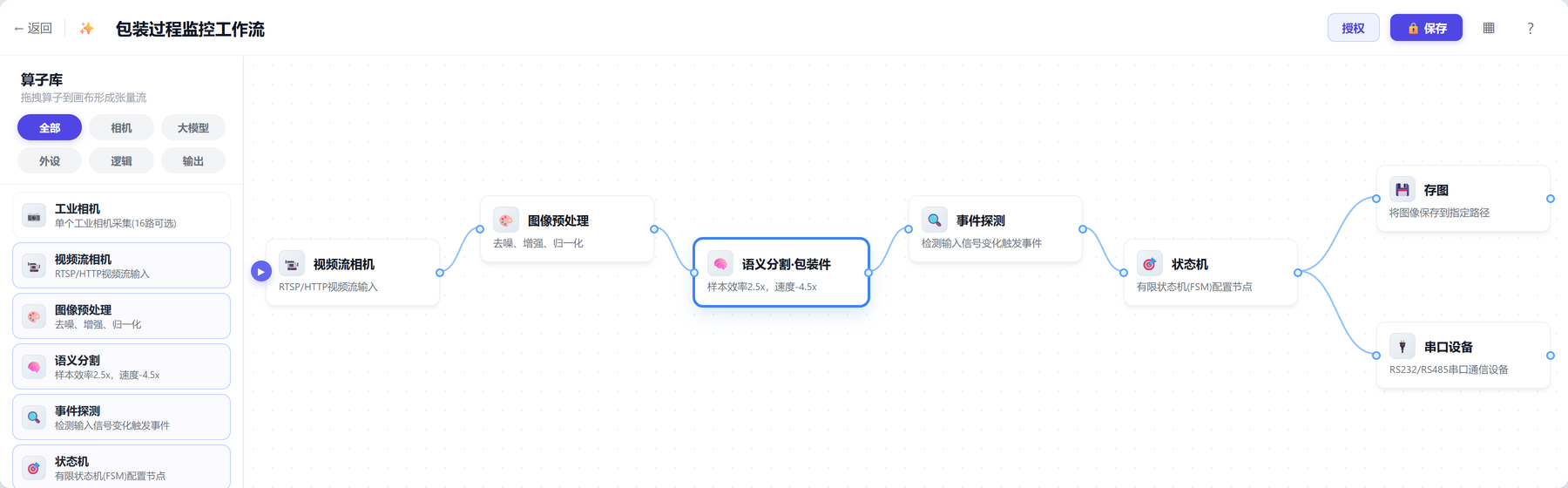
| Node | What it does | Configuration here |
|---|---|---|
| Video stream camera | Brings the station into the pipeline | One RTSP stream, top-down view |
| Image preprocessing | Denoise, enhance, normalise | Exposure pulled down to keep foam cavity edges |
| Semantic segmentation | Outlines each class, frame by frame | 6 classes |
| Event detection | Turns outlines into "something happened" | 7 events |
| State machine | Accumulates events into a verdict per unit | 5 states / 3 actions |
| Image capture | Keeps the frame that failed | Triggered on NG only |
| Serial device | Sends the verdict to the line | Per-unit result over RS232 |
The split is deliberate: recognising is the model's job, deciding whether it counts is the event layer's job, and calling OK or NG is the state machine's job. Keeping them apart is what makes a model changeover or a rule change a local edit instead of a rebuild.
Segmentation: the class list is set by what the NG record must say
SegmentationThis layer answers one question only: in this frame, which pixels belong to which class.
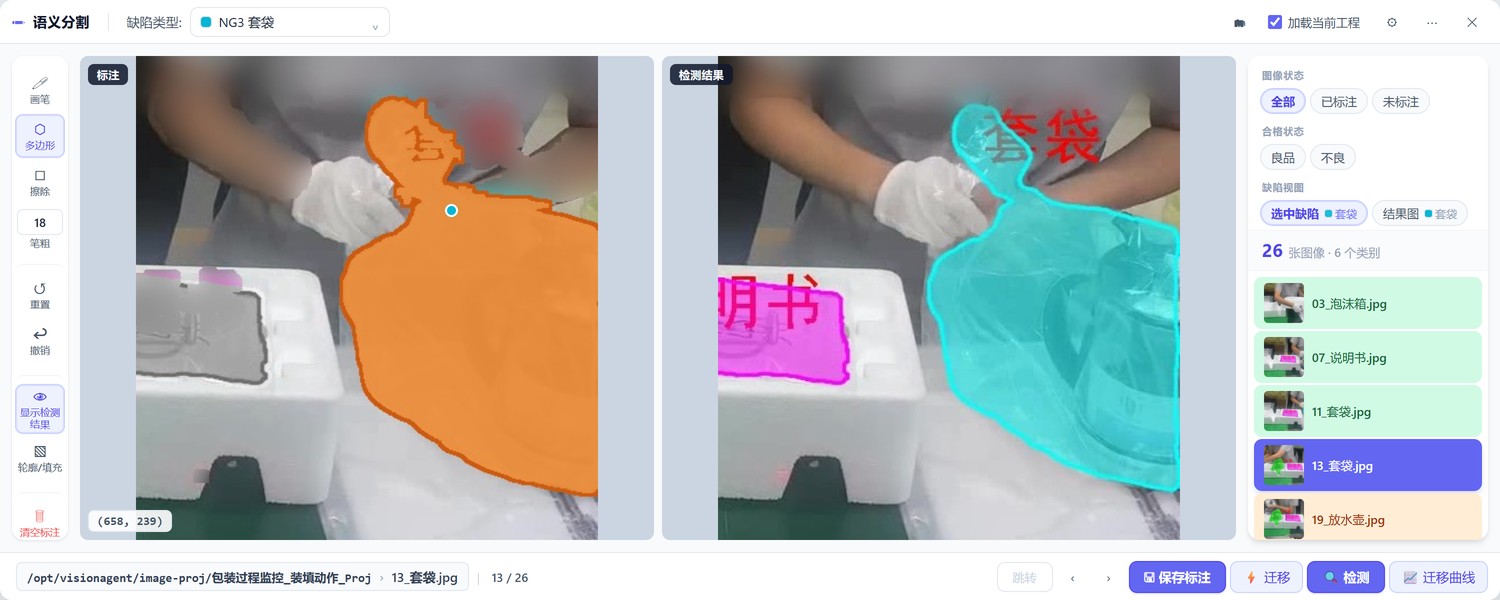
We use 6 classes: foam insert, manual, bagging, kettle placement, base placement, closing. Why not simply "item present / absent"? Because "incomplete" on a report gets ignored, while "missing manual" gets acted on within a minute. The granularity of the class list is decided by the sentence the NG record has to produce, not by what the model can do.
Why segmentation instead of detection boxes: neither the bag nor the foam cavity is rectangular. A box over the kettle only says "the kettle is somewhere around here"; an outline that follows the cavity edge says "the kettle actually dropped into the cavity". For soft packing materials, that is the whole difference.
Each class starts with 5–10 sample images. Run once, pull the misclassified frames back into the training set, run again — all inside this one interface, with no offline training environment. Moving to another appliance model, where the foam shape and the checklist both change, works the same way: add images, do not rebuild.
Event detection: seeing it is not the same as placing it
EventsSegmentation emits a mask on every frame. But "the manual is visible in this frame" and "the manual went into the box" are two different statements.
The operator pulls a manual from the bin, carries it across the station, and sets it down — the manual is in frame the whole time. If visibility alone counted, then carrying material past, picking it up and putting it back, even material from the neighbouring station drifting into view, would all register as a placement. This kind of false trigger is more dangerous than a miss: a miss lets one unit through, while a false trigger makes the system report OK on a unit that really is incomplete.
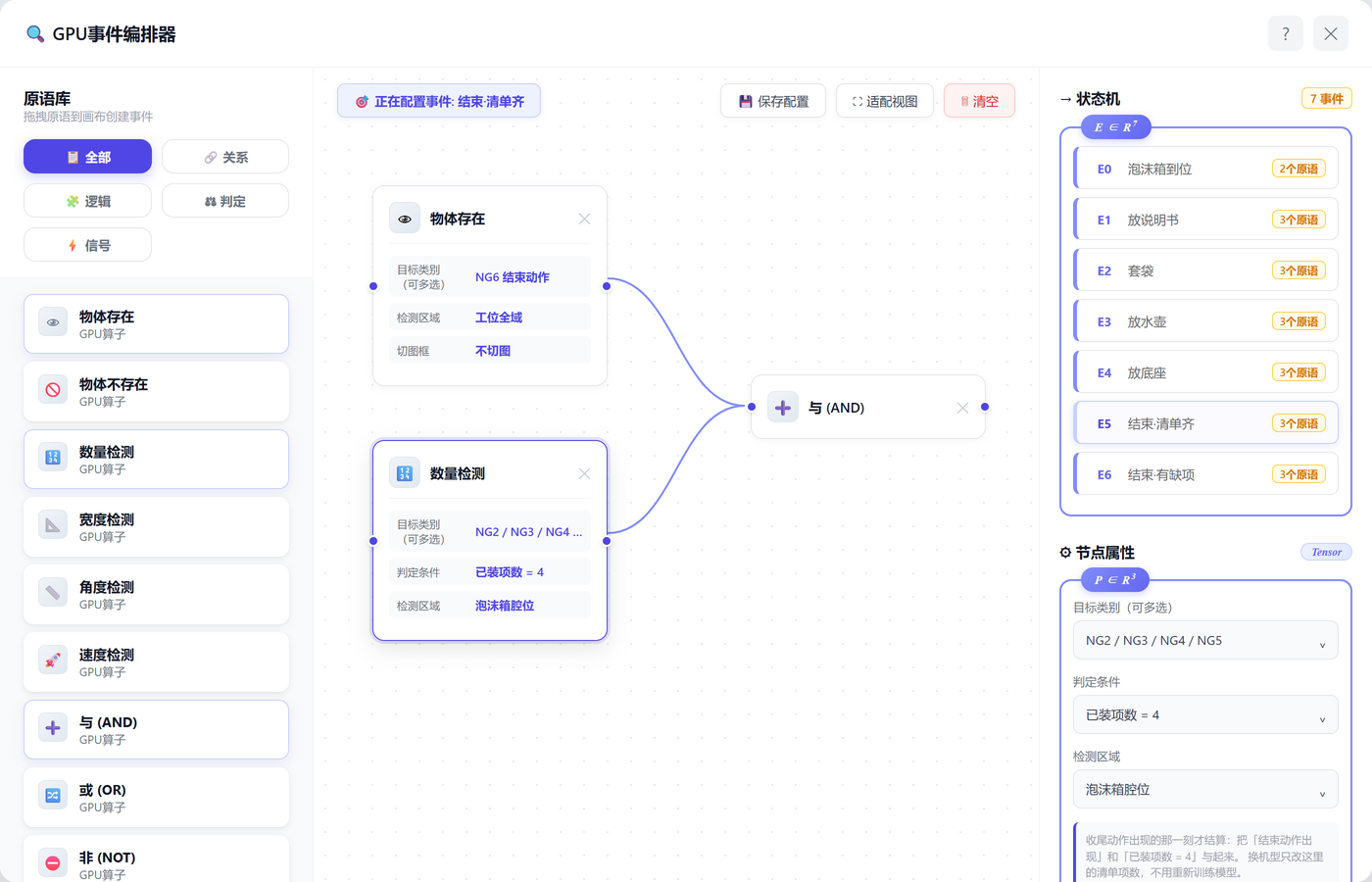
Placement events (E1–E4) all AND two conditions: the target appears inside its designated cavity and stays still for a number of consecutive frames. Material that has landed in a cavity does not move; material in a hand never stops moving. That single condition removes pass-throughs and test fits. The cavity region is drawn on screen and the frame count is typed in — changing either touches no model.
| Event | Trigger | What the state machine does with it |
|---|---|---|
| E0 Foam inserts in place | Both inserts present in the station area and still | Open a new unit |
| E1 Manual placed | Manual lands in the right-hand cavity and stays still | Checklist count +1 |
| E2 Bagged | Bag over the kettle body and still | Count +1, and open the placement gate |
| E3 Kettle placed | Kettle lands in the left cavity and stays still | Checklist count +1 |
| E4 Base placed | Base lands in the accessory cavity and stays still | Checklist count +1 |
| E5 Closing · complete | Closing action appears and items placed = 4 | Call OK, write record |
| E6 Closing · incomplete | Closing action appears and items placed < 4 | Call NG, save image, name the missing item |
E5 and E6 use a different combination: Object present (the closing action) AND Count check (items placed). An explicit closing action is needed as the settlement signal because a packed unit, unlike a machined part, does not leave on its own. Laying the film over the top is the one moment on this station that reliably marks "I am done with this unit". Anchoring to it gives a definite settlement point instead of guessing when a unit ends.
State machine: checklist and physical order on one diagram
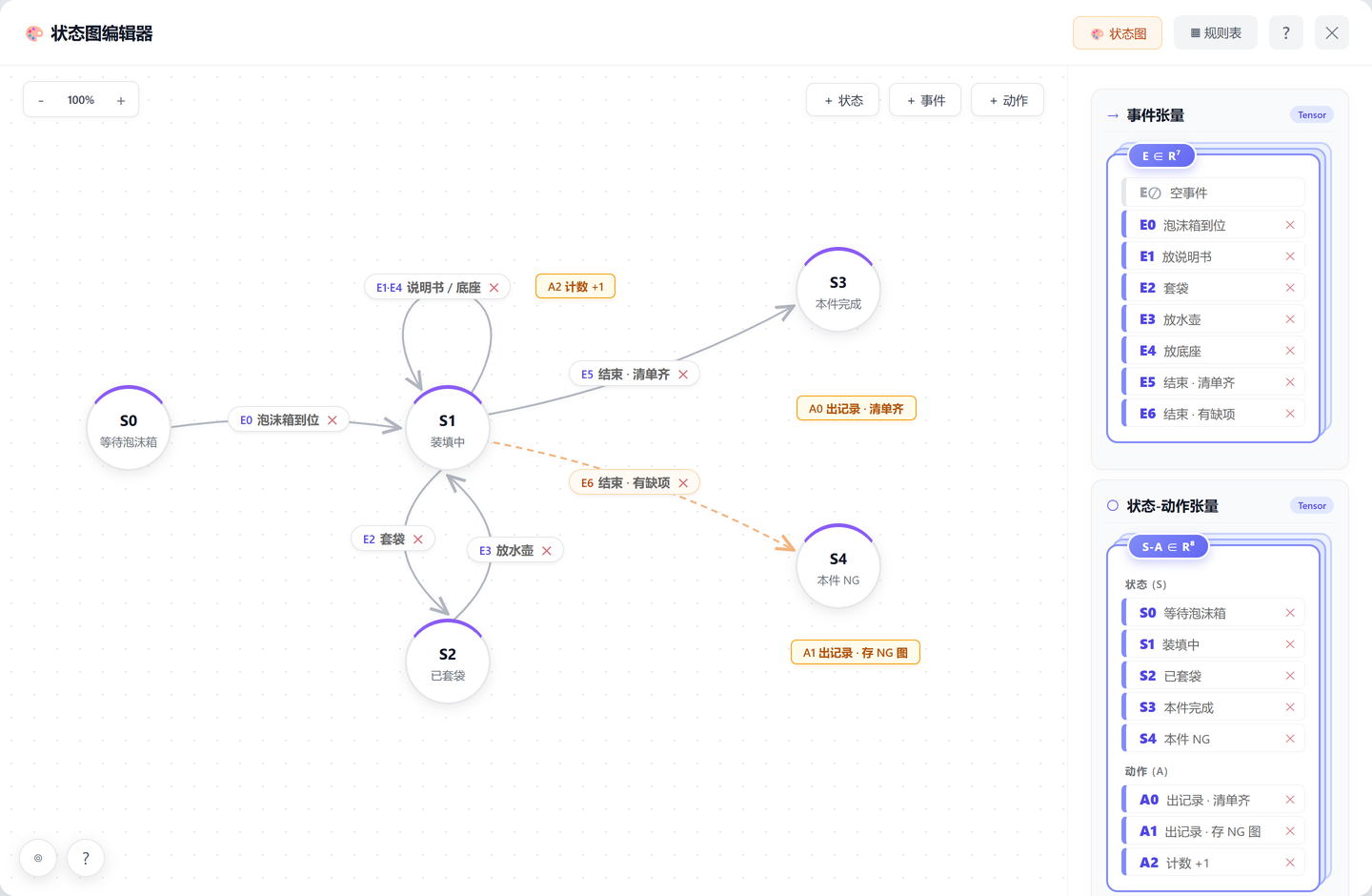
State machineEvents are scattered points; the state machine accumulates them into a verdict per unit. This diagram is the entire decision logic — there is no code.
Manual and base: a set, not a sequence
Either can go in at any point and the unit is still good; operators each have their own comfortable route. So they hang on the self-loop at S1: each trigger increments the checklist count and the state does not change. What the system cares about at settlement is whether the set is complete, not the order in which it filled up.
Bagging and kettle placement: this pair does have an order
The kettle must be bagged before it goes into the cavity — an unbagged kettle rubs against the foam in transit and the finish gets scratched. That is a process constraint, not a habit, so the diagram has to enforce it.
The mechanism is an intermediate state, S2 bagged: bagging (E2) moves the state to S2, kettle placement (E3) is only accepted from S2, and once accepted the state returns to S1 to keep filling. That forms a gate — if the kettle goes in unbagged, E3 lands on S1 and is not accepted, the count does not increment, and by the closing action the unit is necessarily short one item and falls through to NG. No separate "wrong order" rule is needed; the gate structure already catches it.
Settlement: the verdict lands with the closing action
| State | Meaning | Exits |
|---|---|---|
| S0 Waiting for foam | Station empty | E0 → S1 |
| S1 Filling | Unit open, checklist accumulating | E1 / E4 self-loop (A2 count +1); E2 → S2; E5 → S3; E6 → S4 |
| S2 Bagged | Placement gate open | E3 → S1 (A2 count +1) |
| S3 Unit complete | Checklist full | A0 write record, back to S0 |
| S4 Unit NG | Still short at closing | A1 write record + save NG image, back to S0 |
Rules follow the site, without rebuilding the system
CustomizationOn an appliance line, models change more often than the line does. Keeping the decision logic on a state diagram is what keeps those changes inside the configuration layer.
| What the site asks for | How it is done | Retraining? |
|---|---|---|
| New model, one extra accessory | Add a class and an event, set the checklist to 5 | Sample images for that class |
| This model ships the manual outside the carton | Drop E1 from the checklist | No |
| Let the operator fix it on the spot | Add a recovery event from S4 back to S1 | No |
| Warn only, do not call NG | Change A1 to push a message without an NG record | No |
| Different settlement signal (case sealer) | Swap the primitives behind E5 / E6 | No |
| Mixed models on one line | Run several workflows on one edge box, switch with the model | No |
The cost of replicating this sits in sample images and cavity regions, not in code. One edge box can carry several stations and several workflows at the same time, so bringing up a new station means copying a configuration and adjusting parameters, not starting a new project.
What to prepare before going live
Deployment| Item | Notes |
|---|---|
| Camera position | Top-down, covering every cavity in both foam inserts. A slightly off-axis mount is fine; what matters is that the operator's body does not sit over a cavity for long stretches |
| Lighting | White foam blows out easily — pull the exposure down a stop to keep gradation at the cavity edges. The transparent bag is defined by reflection, so avoid a hard light facing the lens |
| Compute | One edge GPU box beside the line; video stays in the plant and there is no cloud round trip |
| Samples | 5–10 images per class to start; run once, add the misclassified frames, run again |
| Interfaces | Results over serial, image saved on NG; whether to interlock the case sealer depends on the site |
| Commissioning | Observe without judging for the first two days and confirm there are no false alarms before enabling verdicts |
Takeaways
Takeaways- Use segmentation, not detection boxes, for soft packing items. Foam cavities and transparent bags are not rectangles; only an outline can show that something landed inside.
- Let the NG report define the class list. Decide what action the record should trigger on the floor, then work backwards to the granularity.
- False triggers are more dangerous than misses. Suppress them in the event layer with regions and stillness conditions, rather than hoping the model figures it out.
- Encode physical constraints in the diagram instead of writing rules. One intermediate state enforces bag-before-place; no separate order check is needed.
- Keep the decision logic on the state diagram. A model changeover is a diagram edit, not a code change — which is what makes this sustainable on a line like this.
Packing stations share a profile: many variants, checklists that change quickly, and every unit finished by hand. Few-shot configuration brings the cost of a new model down to a handful of images, edge inference keeps the judgement local to the line, and the state diagram captures process constraints in a readable form. The same three steps carry over to the next station and the next plant.
About the author
PhD in computer vision, working on few-shot segmentation and video action understanding; 12 years on industrial vision projects, with 30+ production lines and 100+ stations delivered.
Currently focused on edge GPU inference optimisation, cross-domain generalisation and closing the loop on field data — so that the same configuration method transfers between plants and processes. These articles record the actual configuration, decision logic and field results from real deployments.