Catching Missed Connections
on a Car Seat Wiring Station
Four wiring harnesses go onto the seat in any order the operator likes — but not one of them may be skipped. This is how we turned "connected or not" into a class the model can recognise, so a missed connection shows up right at the station.
K E Y P O I N T S
- The core problem. A missed connection never shows itself at the station: once seated, the connectors are covered by the seat frame and trim cover. It surfaces at end-of-line electrical test, sometimes after delivery — and by then the repair means pulling the whole seat out.
- No fixed order. Operators connect the four harnesses in whatever order suits them, so the usual "walk the SOP step by step" approach simply does not apply. The question is not was the order right but is anything missing.
- The design trade-off. Rather than measuring the gap in the latch, we treat "connected" and "not connected" as two different things to recognise — the decision rests on a visible difference in shape.
- Few-shot start. Four connected classes (red, yellow, green, blue) plus one "unconnected present" class, five in all. 1–10 field images per class is enough to define them in the labelling tool, and configuration takes minutes.
- Completeness in a single AND.
E1 All four connected= count check (four connected classes total = 4) AND object-absent ("unconnected present"). Miss one and it never fires; the state stays at "connecting".
The station: four harnesses on a seat
The whole chain is five operators, and that is also the outline of this article:
Why a missed connection is hard to catch
First, what makes this station difficult. None of these three is fatal on its own; together they rule out the conventional approach.
Stack the three together and the shape of the solution follows: let the model recognise directly whether a given harness is currently connected or not, then apply one order-independent condition to decide whether anything is missing. The next sections put those two jobs into segmentation and event detection respectively.
Tensor flow: three jobs, one chain
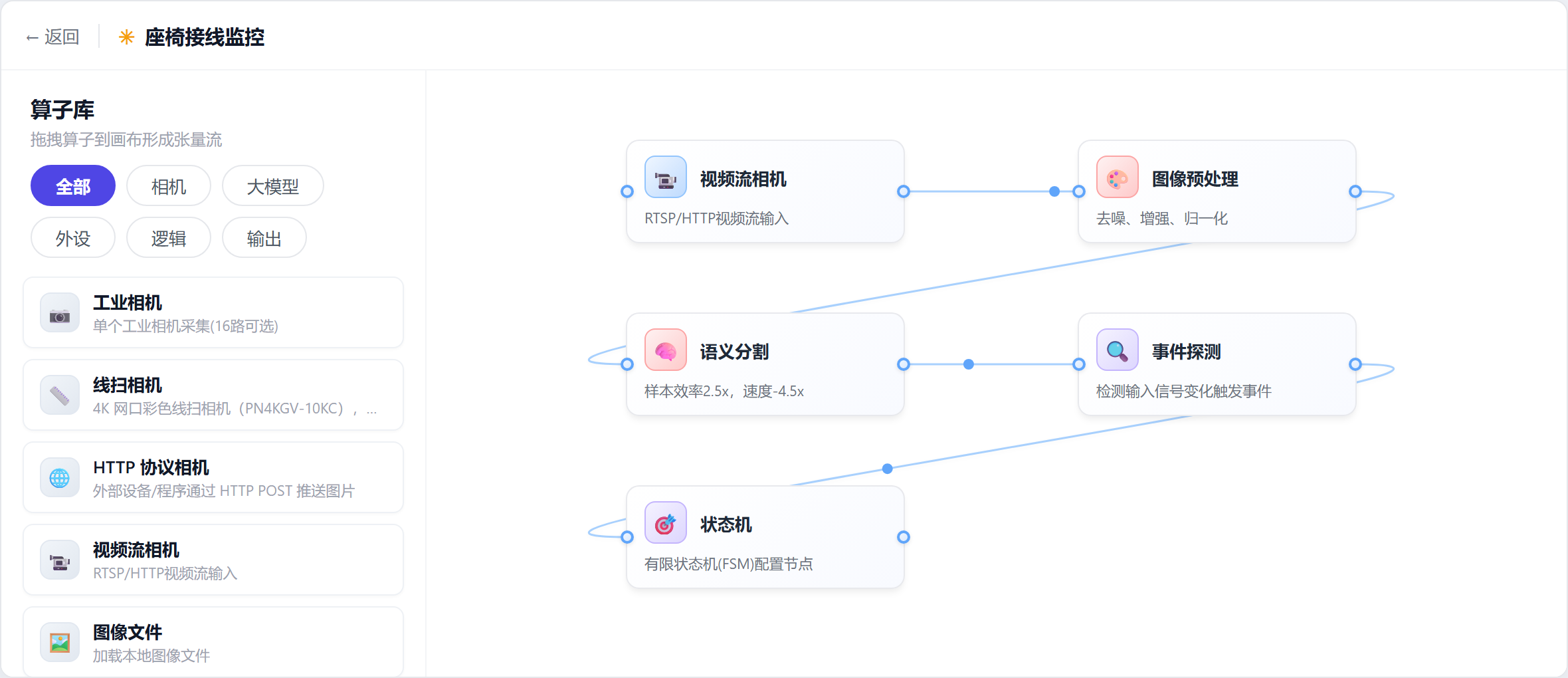
Configuration starts on this canvas. Operators are dragged out of the library on the left and wired into a chain on the right — a chain that only ever handles three things: seeing, deciding, and progressing.
The payoff of splitting them shows up repeatedly below: classes are defined in segmentation, decision logic is built in event detection, and progression rules live in the state machine. Change any one of them and you touch only that stage — no going back to retrain the model.
Segmentation: make the state a class
This section is the one real trade-off in the whole design.
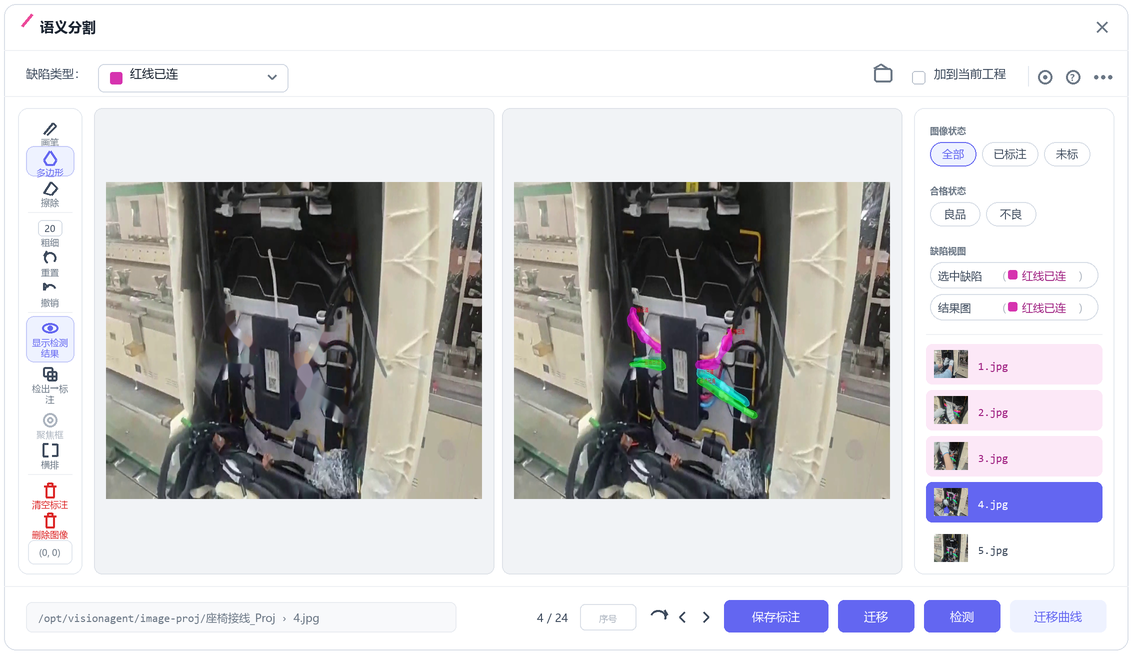
The conventional route would segment the connector first, then find some way to measure how far it is seated. We took a different line: treat "connected" and "not connected" as two different things to recognise outright. To a model they genuinely are two distinguishable shapes — the boot sits flush, the terminals are drawn in, the latch is closed. Those are visible differences, and reading them does not require measuring anything first.
So the class list came out like this, five in all:
| Class | What it marks in the image |
|---|---|
| Red connected | the red harness fully seated |
| Yellow connected | the yellow harness fully seated |
| Green connected | the green harness fully seated |
| Blue connected | the blue harness fully seated |
| Unconnected present | any harness not seated: terminal exposed, boot standing off |
The colour chips are the mask colours the platform assigns to each class so they can be told apart on screen. They are not the harness colours.
This table is worth a second look, because it settles the next two sections in advance. "Connected" is split into four classes, one per harness, while "not connected" needs only one: whether each harness is seated can be read straight off the classes, and whether anything is still open is just a question of whether one class is present. The state is written into the classes themselves, so the decision never has to go back and measure.
The configuration work itself is light: grab 1–10 images per class from the station feed, outline them on the labelling canvas, hit Transfer to train on what is labelled — minutes, not hours — then hit Detect to re-run the current model over the same set and look for misses and false marks. Not good enough? Add a few more images and go round again.
Event detection: one AND decides it
Segmentation says what is in the image; event detection turns that into what happened on the floor. This layer never touches the model — it only assembles decision logic.
Because order is not required, this station does not need a "seated" event per harness to gate steps. There is really only one thing to decide: are all four connected? That splits into two conditions which must both hold, joined by AND:
| Condition | Primitive | Test |
|---|---|---|
| All four are there | Count check | the four connected classes total = 4 |
| None left open | Object absent | not one instance of "unconnected present" remains |
Each condition covers the other's blind spot. Counting alone would read four occluded harnesses as "nothing unconnected"; the absence test alone would be satisfied by an empty station where the work has not started. Together they ignore order without mistaking "not done" for "done".
Building it this way has an immediate benefit: when the seat later gains a fifth harness, the only edit is changing the count from 4 to 5. Parameters affect the decision only — the segmentation model stays as it is.
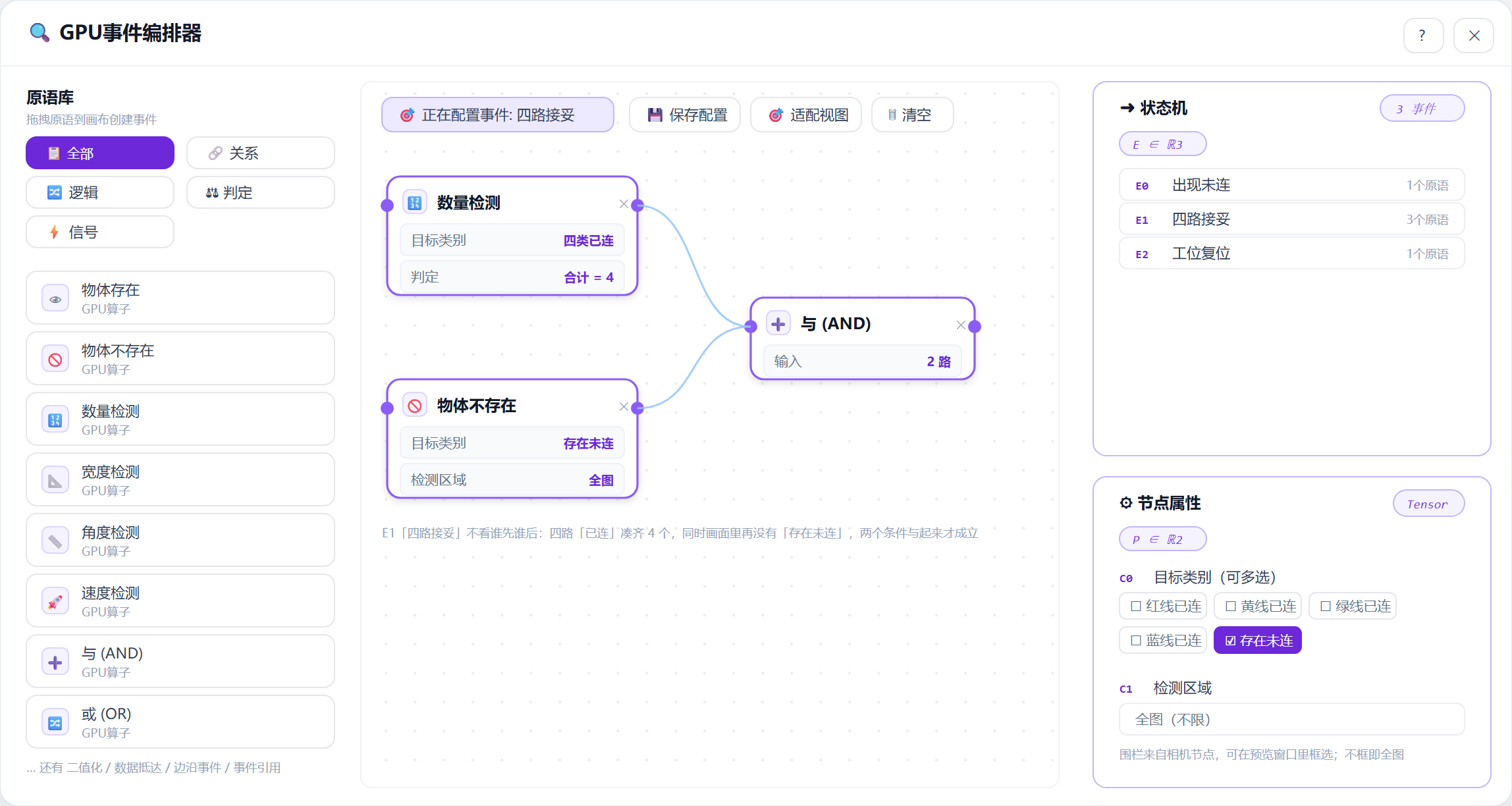
E1 All four connected open. Both primitives feed into an AND node; links enter and leave the ports horizontally, with no arrowheads.State machine: miss one, never release
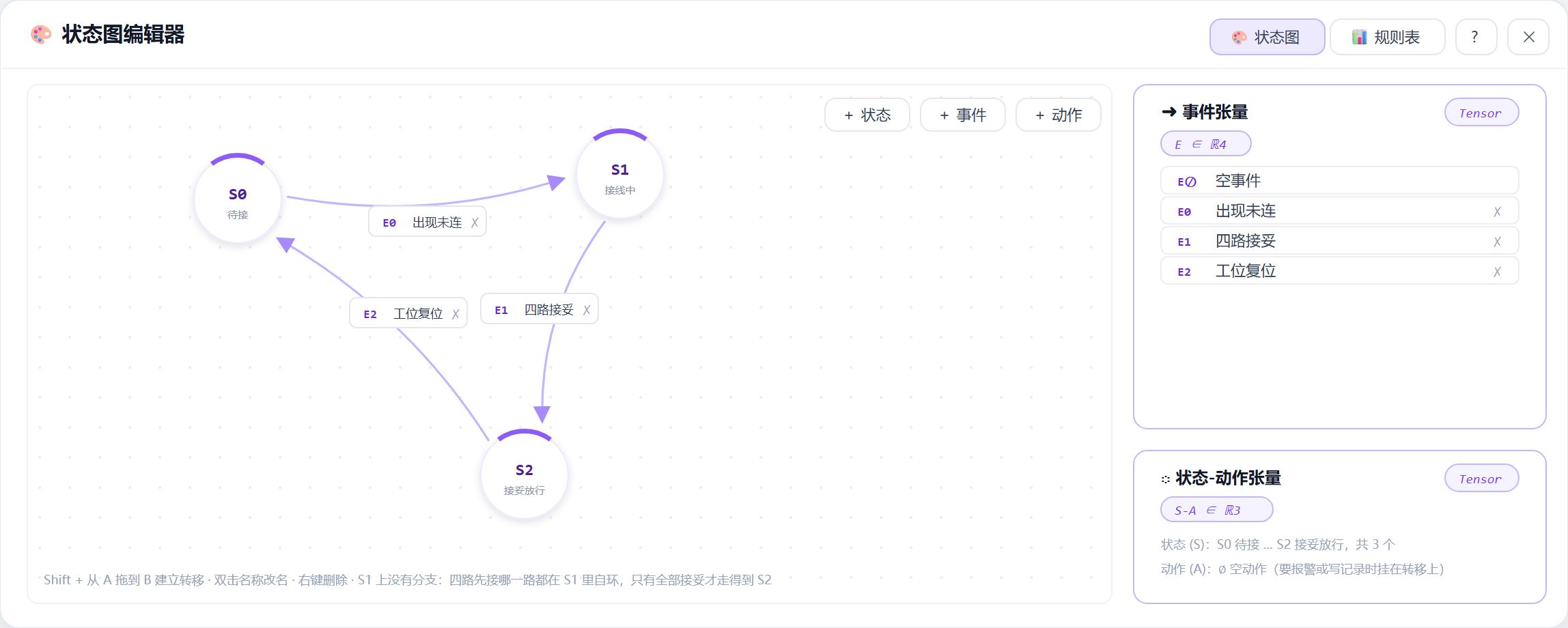
Events answer "is anything missing right now"; the state machine tracks how far this unit has got. Since order is unconstrained, the machine is thin — three states.
The freedom of order lives in S1: that state has no branches. Red first or blue first, a pause to fetch a tool, even unplugging and redoing one — all of it is just a self-loop within S1. The machine takes no interest in what the process looked like. It waits for exactly one thing: E1 to hold.
And that is precisely where the constraint bites: skip a harness and the count never reaches 4, "unconnected present" is still on screen, E1 never holds, and the state sits in Connecting — it never reaches release. What the station sees is that one harness still carrying its red "unconnected" mask.
Which makes changeover cheap: for a fifth harness, change the count in E1 from 4 to 5 and leave the state machine untouched; for a different seat model, rename the classes. None of it touches the segmentation model.

Running live: 48 seconds on the line
Below is the station actually running. The red masks are "unconnected present"; once a harness is seated it switches to its own colour and is labelled connected.
One detail is worth noticing: the moment a harness is seated, its mask flips from red to that harness's own colour. That means nobody on the floor has to read a number or wait for a results page — however many red patches are left on screen is however many harnesses are still open. The decision output doubles as the operator's prompt.
Review: where this approach stops working
Don't force step-gating onto an order-free station
The default play in process monitoring is to break the SOP into steps and advance through them, but that assumes the order is itself fixed. An order-free station needs a different formulation: state the requirement as an end-state condition that ignores the process, and let the state machine simply wait for it. The logic ends up simpler, and it holds up against whatever the floor actually does.
Put the state in the classes and changeover needs no retraining
"Connected or not" lives in the segmentation classes, "is anything missing" lives in an AND of two primitives, and "how far along" lives in the state machine — three concerns, kept apart. So an extra harness is one number, a different seat model is a set of class names, and the segmentation model does not move.
One appliance, many stations
Compute is concentrated on the edge appliance; the station keeps only a camera and a display. A single unit can carry the workflows of several stations and several lines at once, each with its own classes, events and state machine, none interfering with the others.
Being clear about the limits
This suits assembly states with a visible difference in shape: harness seating, latches, locks, whether a part is placed. It does not suit a connection that is covered the instant it is made and never has a visible moment — that needs either a process change to leave one visible checkpoint, or a second close-range camera.
Moving to other scenes
The same base in a different setting is still 1–10 sample images and minutes of configuration. Directions already covered:
Looking back across the project, four questions ran through all of it: what the system looks at, what counts as connected, what counts as a miss, and how the record is kept. Answer those four on the configuration screens and the station is running.
Turn "connected or not" into a shape the model can recognise, then judge completeness with one order-blind condition — operators work however they like, and missing one harness means never reaching release.