Foundation-Model Vision · VisionAgent / Field Deployment
Pharmaceutical: Grade B Cleanroom Gowning Behavior Recognition — Field Practice
Six ordered steps, five classes of PPE, one motion event — the system checks in real time whether each step was done and whether the order was right, with all inference staying on the plant floor.
KEY POINTS
- The core tension. The acceptance criterion for gowning is not "is there a mask in the frame" but "were six things done in the right order" — a single-frame detector cannot answer a process question that requires memory.
- Split into two jobs. The foundation model only has to see; the state machine judges the order. When the SOP changes, you change the state machine configuration, not the model.
- Chained into one tensor flow. Seven operators dragged onto a canvas and wired up: camera → preprocessing → two segmentation branches → event detection → state machine → frame capture. No code anywhere.
- Few-shot start. The entire project used 12 field frames across 5 classes — two or three per class. A new class takes 1–10 frames and a few minutes to configure.
- Nothing on site changes. Existing CCTV is reused, inference runs on a local edge GPU and video never leaves the plant. The AI sits as a side-channel observer: it is not in the control loop and does not touch the existing alarm strategy.
The gowning room of a Grade B cleanroom at a pharmaceutical plant already had CCTV. The requirement: without changing the production process and without touching the existing audible-visual alarms, recognize, log and flag the gowning order and PPE outcomes in real time, producing traceable audit data.
01/6REQUIREMENTS
Translating "gown according to the SOP" into rules a machine can check
What the customer asked for was one sentence: before entering the Grade B area, put on your PPE according to the SOP. That sets the goal, but the system also needs to know which classes of item to recognize, in what order to check them, what counts as a missed step, and how results are retained. The real work of the project was this translation.
Gowning is not "detect one thing", it is "do six things in order". Traditional AOI and object detection are good at answering "is there a mask in the frame", but the acceptance criterion is "mask → hood → coverall → shoe-tying → goggles → gloves, none skipped and none out of order". The first is a single-frame judgment; the second is a process judgment that carries memory.
So the system was split along that tension: the foundation model sees, the state machine judges the order. That one cut determines every maintenance cost that follows — changing the acceptance criterion means editing one state machine configuration, not retraining a model.
| Site constraint | How the system satisfies it |
|---|---|
| Existing CCTV / NVR | Pull RTSP directly and reuse what is there; add a close-up only where finer detail is needed |
| No change to process or alarms | The AI is a side-channel observer and stays out of the control loop |
| Raw video must not leave the plant | Inference on a local edge GPU in the workshop; only events and evidence go out |
| Events must be traceable and reviewable | Key frame + short clip + confidence + the event and rule that fired |
| The SOP will change, no factory returns | Order changes are configuration changes; a new target class starts from 1–10 field frames |
SCOPEWriting down what it can and cannot do, on day one
This looks like self-imposed limitation; in practice it is what keeps acceptance from turning into an argument. Vision has hard physical limits, and if you gloss over them, every later review reopens the same fight.
CAN DO
- Gowning step order and missed steps
- Whether mask / hood / coverall / goggles / gloves are worn
- Key motions such as tying shoelaces
- Entering the clean area before gowning is complete
- Touching the face, leaning on walls, sitting on benches
PARTLY
- Hand sanitizing: the pump motion is visible, whether liquid came out is not
- Mask coverage and stray hair: needs a face close-up camera
EXPLICITLY NOT
- Expiry dates on cleanroom garments
- Whether zippers and cuffs are fastened tight
- Masks worn inside out, or reused after falling on the floor
- Subjective requirements such as "no large turning movements"
02/6TENSOR FLOW
Seven operators wired into one flow on a canvas
The backbone of the whole configuration is a single tensor flow canvas. The engineer drags operators out of the library on the left, wires them in the direction the data travels, and fills in parameters inside each node — not a line of code. Look at the complete flow first; the next three sections are all about what happens after you double-click one of these nodes.
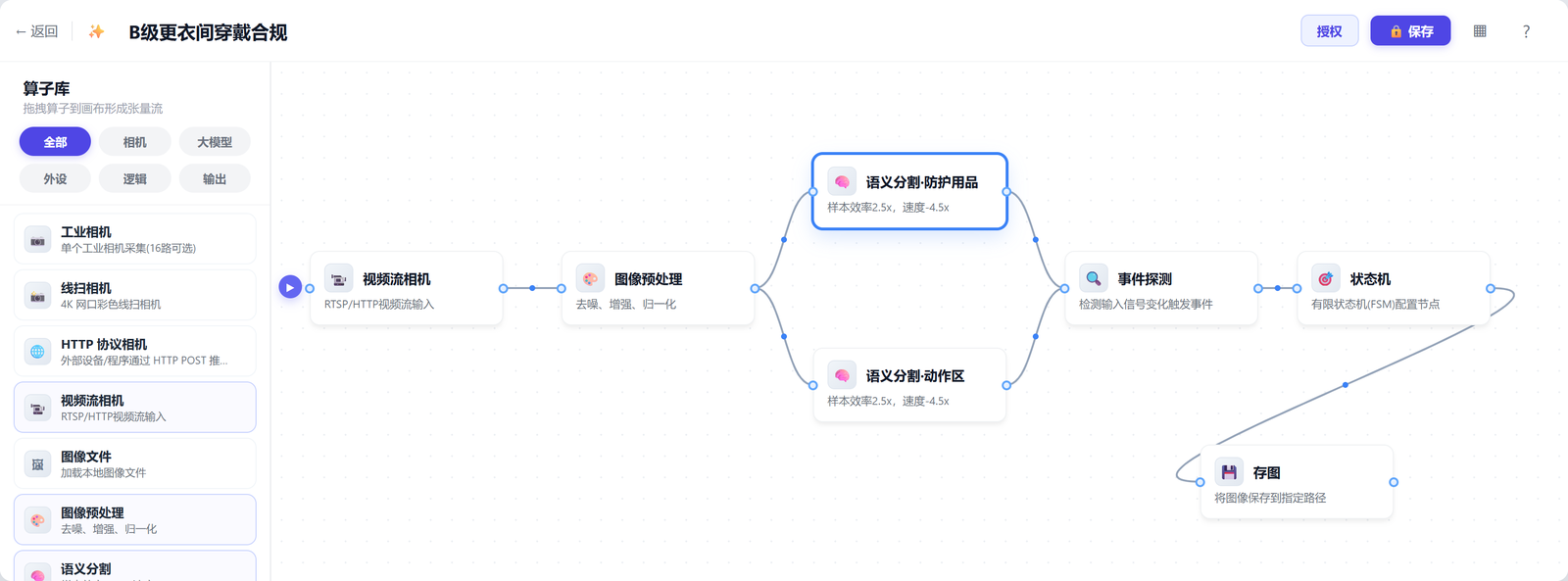
| Operator | What you configure | Why it is its own layer |
|---|---|---|
| Video stream camera | RTSP address, frame rate, camera position | Reuses existing CCTV; video circulates locally only |
| Image preprocessing | Denoise, enhance, normalize | Lighting varies widely in the gowning room; flatten it before the model |
| Semantic segmentation · PPE | Minimum area, detection confidence and debounce frames for 5 classes | "Seeing" is trained only here, starting from 1–10 field frames per class |
| Semantic segmentation · motion zone | Segments the shoe-tying zone only | Motion is judged on speed, tuned separately from object presence |
| Event detection | The decision logic for E0–E5 | Translates pixels into business language; pure configuration |
| State machine | States, transitions, actions | Order and acceptance criteria live here — the cheapest place to change |
| Frame capture | Trigger timing, save path | Leaves reviewable key frames; stays out of the control loop |
Almost everything the site needs to change lands in the parameters of one node: move the camera, edit the first node; adjust sensitivity, edit segmentation; change the decision criteria, edit event detection; change the step order, edit the state machine. None of them drag the others along.
03/6SEGMENTATION
Teaching the system to see PPE
Why pixel-level segmentation rather than bounding boxes: in the gowning room people stand sideways, bend over and are half-dressed; the coverall and the wall are both pale, and a gloved hand has a similar outline to a bare one. Box regression in that setting readily mistakes "holding it" for "wearing it". Segmentation returns a mask, so area and position can then separate the two cases.
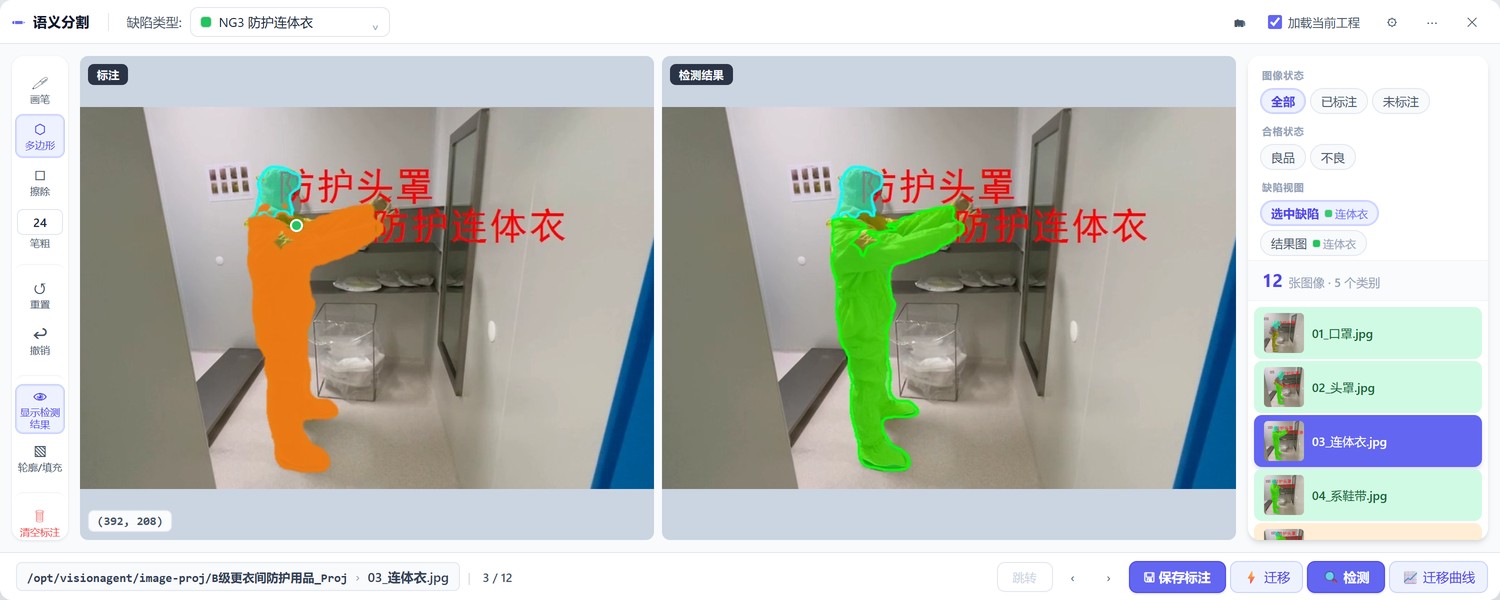
| Class | Mask | Judges | Difficulty |
|---|---|---|---|
| NG1 Protective mask | Magenta | Presence | Small visible area in profile; area threshold loosened |
| NG2 Protective hood | Cyan | Presence | Same color family as the coverall; separated by head-region position |
| NG3 Protective coverall | Green | Completeness of wear | "Holding" vs "wearing" separated by mask overlap with the body |
| NG4 Protective goggles | Purple | Presence | Strongly reflective; samples must cover varied lighting |
| NG5 Protective gloves | Blue-violet | Presence (one per hand) | Inner and outer gloves look alike; separated by color plus count |
Thanks to the transformer's few-shot capability, adding a class takes 1–10 field frames and a few minutes to configure and see results; adding samples and clicking Transfer runs an incremental pass rather than a retrain from scratch. Moving to another gowning room, classes and samples carry over — which is why one system can cover many stations and many lines.
04/6EVENT LOGIC
Turning pixels into "this step is done"
Segmentation only sees pixels; the business needs decidable events like "the hood is on" or "the coverall is on". That logic is assembled in the event orchestrator: drag decision primitives out of the library, pick the target class in the node properties, then combine them with AND / OR / NOT into a condition. Changing a decision means changing parameters and wires.
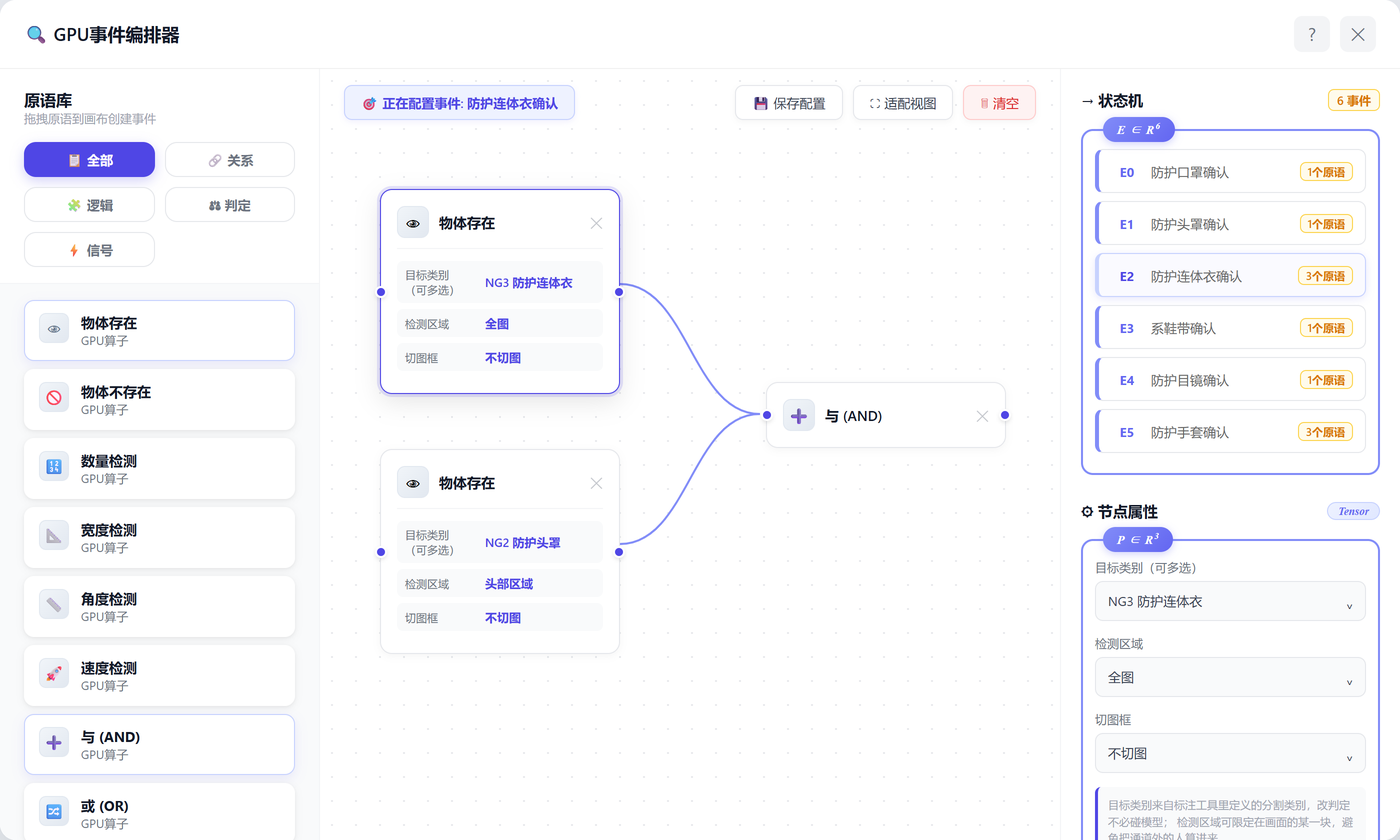
| Primitive | How it is configured | Where this project uses it |
|---|---|---|
| Object present | Target class (multi-select) + detection region + crop box | E0–E2, E4: mask / hood / coverall / goggles |
| Object absent | Exactly one class; fires when it is missing | Backward moves such as taking the hood off |
| Count check | Comparison mode + threshold | E5: gloves need one per hand, count = 2 |
| Speed check | Motion speed threshold (px/s) + duration in frames | E3: motion events such as tying shoelaces |
| AND / OR / NOT | Wire several primitives together | E2: coverall present and hood present |
One event judges one thing. Stabilize segmentation before touching thresholds. For false positives, raise debounce frames first; for missed detections, lower the minimum mask area and the detection confidence first.
05/6STATE MACHINE
Order is enforced by what is not on the diagram
Order is not enforced by writing extra NG rules but by the fact that any unexpected event is a self-loop: the flow advances only where the cell for "current state × its event" has a target state filled in. Skip a step and nothing moves; miss a step and you never reach the end. Where an alarm or a log entry is needed, an action is attached to the transition.
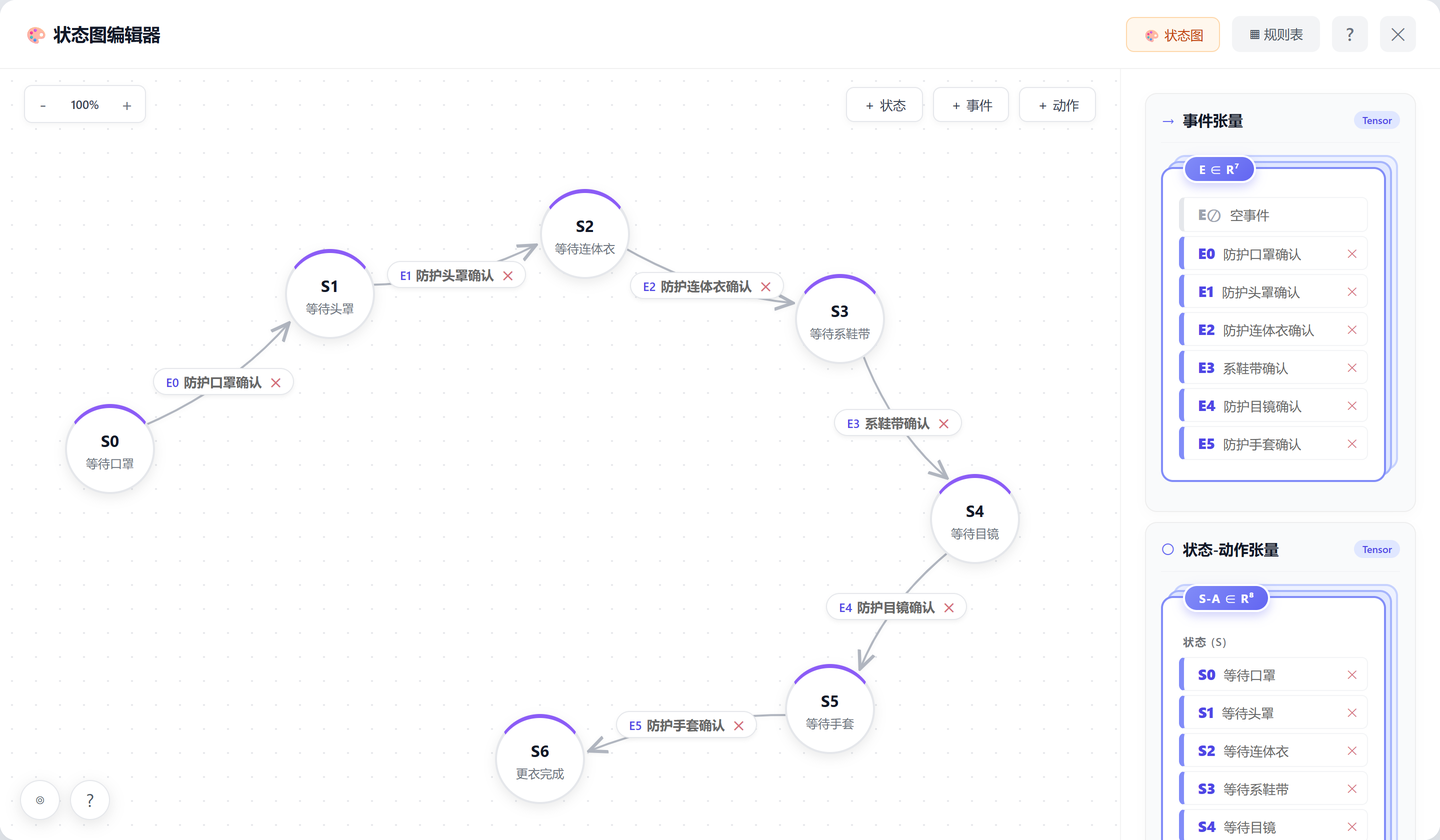
E0–E5. Circles can be dragged
anywhere on the canvas and the event labels follow their connections. Only one edge, E0, leaves S0 — so even
if the coverall goes on first and E2 is already true, no edge can be taken and the flow stays put. That is
how order is enforced. To create a transition, hold Shift and drag from A to B on the canvas, then pick the
event; the Rule Table tab shows the same configuration as a matrix, where only the six diagonal cells
carry a target state and everything else self-loops. The state-action tensor panel on the right lists the
seven states plus the single action A0 log OK · save key frame, bound to S6.
| State | Awaited event | How the event is judged | On success |
|---|---|---|---|
| S0 Awaiting mask | E0 Mask confirmed | Object present (protective mask) | → S1 |
| S1 Awaiting hood | E1 Hood confirmed | Object present (protective hood) | → S2 |
| S2 Awaiting coverall | E2 Coverall confirmed | Coverall present and hood present | → S3 |
| S3 Awaiting shoe-tying | E3 Shoe-tying confirmed | Motion-zone speed + duration in frames | → S4 |
| S4 Awaiting goggles | E4 Goggles confirmed | Object present (protective goggles) | → S5 |
| S5 Awaiting gloves | E5 Gloves confirmed | Gloves present and count = 2 | → S6 |
| S6 Gowning complete | — | Log OK, write elapsed time and key frame | End |
Insert a step (hand sanitizing, say): add one state and one event, build its logic in the event orchestrator, then change two cells in the rule table. Reorder: move the green cells in the rule table. Move to another gowning room: copy the whole state machine, keep the segmentation classes, add a few field frames and run a transfer pass. None of this touches the model, and none of it needs an algorithm engineer on site.
06/6ROLLOUT
What IT has to prepare is a one-time checklist
None of this involves rebuilding the production network. For the customer's IT team the deployment is a one-time cooperation; maintenance afterwards lives in the configuration UI on the business side.
| Item | Detail | Owner |
|---|---|---|
| RTSP addresses and a read-only account | Stream address per camera position; read-only is enough | Customer IT |
| Edge server | GPU-equipped, in a cabinet the video can reach | Customer procurement, or supplied by us |
| Network policy | Pull video, push events; no internet access needed | Customer IT |
| Storage and backup | Evidence retention period, configuration backup policy | Agreed by both sides |
| Account permissions | Operator / reviewer / administrator | Customer assigns, platform configures |
One edge agent can carry several camera feeds and several tensor flows at once: gowning room, airlock and aseptic bench share one device and one configuration UI. Adding a station mostly means adding a camera, copying the tensor flow and contributing a few field frames — not standing up another system.
07TAKEAWAYS
Define the requirement clearly and everything after it holds
Looking back, what took the time on this project was not the model. It was breaking a one-sentence requirement into three layers of definition that could actually be built:
- Business requirement: PPE must be correctly worn before entering the Grade B area, and missed or out-of-order steps must be detectable.
- Decision rules: check the six steps — mask, hood, coverall, shoe-tying, goggles, gloves — logging state along the way and producing a verdict.
- Software configuration: seven operators forming one tensor flow, plus an
S0–S6state machine that fixes how it advances.
Only once those three line up do image collection, model training, tensor flow configuration and the acceptance criteria share a common baseline. The clearer the definition, the less rework later.
The other lesson is where you put the cost of change. In this system the SOP is the thing most likely to change and the model is the hardest thing to change, so the design deliberately puts the SOP in a single state machine table and leaves the model responsible only for seeing. A system survives only if the people on site can change it.
Four questions ran through the whole implementation: what does the system look at, when does a step count as done, what fails outright, and how are results retained. Answer those four and the rest is configuration work.
Leo
PhD in computer vision · VisionAgent solutions and delivery
PhD in computer vision, researching few-shot segmentation and video behavior understanding; 12 years of hands-on industrial vision experience across 30+ production lines and 100+ stations.
Currently focused on edge GPU inference optimization, cross-domain generalization and closing the data loop on site — making one way of configuring a system reproducible across different plants and different processes. This article records the actual configuration, decision logic and field results of a pharmaceutical Grade B cleanroom gowning behavior recognition project.