Monitoring Manual Assembly
on an Engine Crankcase Station
An overhead camera watches the crankcase: timing chain, right-case close, oil-pump gear, locating pin, then oil-pump confirmation — each step must finish before the next; skipped or missed steps show up on the spot.
K E Y P O I N T S
- The core problem. Once the case is closed, internal work is hidden. A missed timing chain, oil-pump gear or locating pin — or a wrong order — often surfaces only in later tests or tear-down rework, costing far more than one extra look at the station.
- Order is the constraint. These steps depend on each other — the right case closes off access, and pin / pump checks sit at fixed nodes. The system must judge not only “is it there”, but whether it belongs at this step.
- Few-shot start. Five classes — timing chain, right case, oil-pump gear, locating pin, oil pump — each settled with 1–10 on-site images in the labelling tool, configured in minutes.
- A state machine enforces the hand sequence.
S0–S5advance through the five-step SOP; unexpected events self-loop — skips do not advance, and a miss never reaches release. - Edge-local inference. Video is analysed on a shop-floor GPU in real time and does not leave the plant; one agent can cover multiple stations and lines.
Brief: five steps on the crankcase
The pipeline is five operators — the spine of this article:
Why missed steps are hard to catch
Three difficulties are each manageable alone; together they shut out “sample after the fact”.
Together, the shape of the solution is: recognise the class being fitted, express “this step holds” as an event, and lock order in a state machine — skips self-loop, misses never reach release.
Tensor flow: one stream, three jobs
Configuration starts on this canvas. Drag operators from the left library, wire them on the right — the stream does three jobs only: see, decide, order.
The split pays off later: classes live in segmentation, verdicts in events, order in the state machine. Change one without retraining the model.
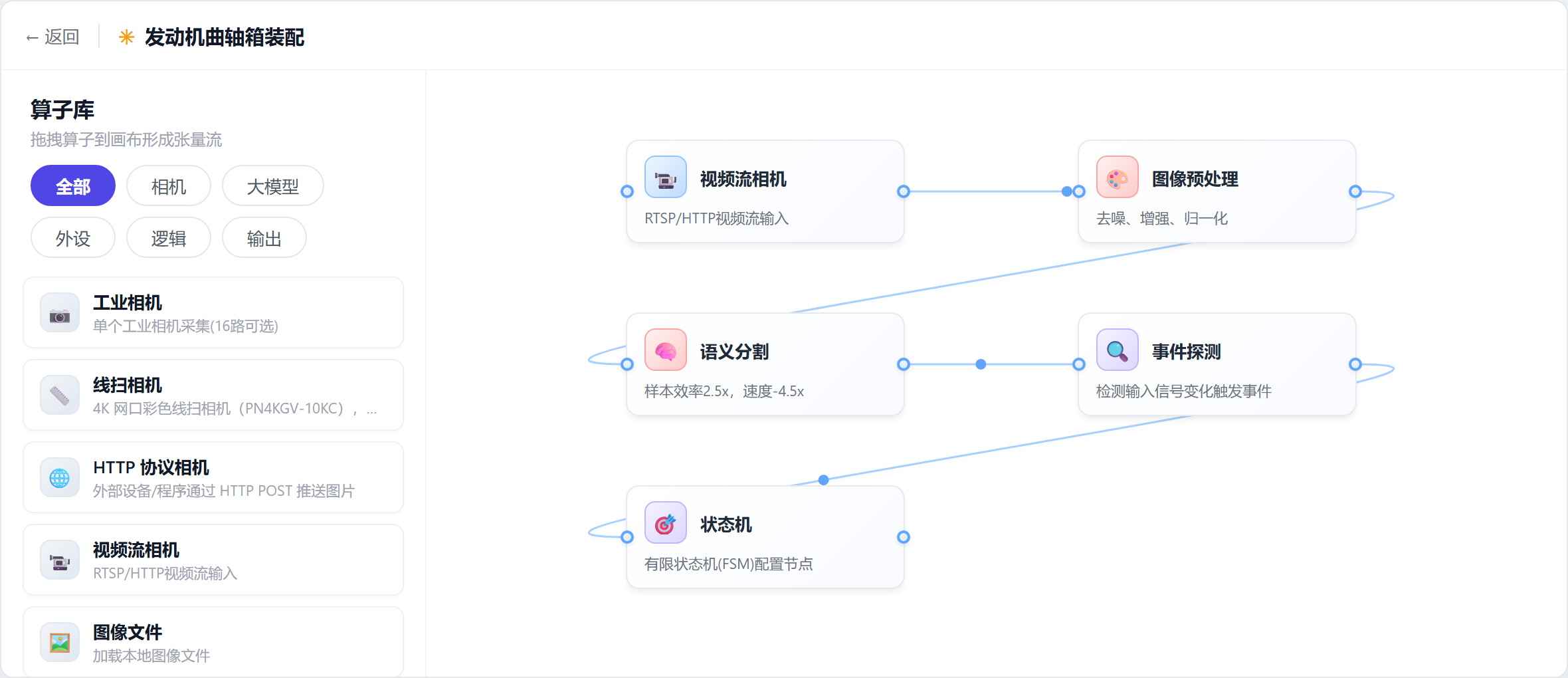
Semantic segmentation: see what is being fitted
This section answers “which class is in play” — events and the state machine both rest on that table.
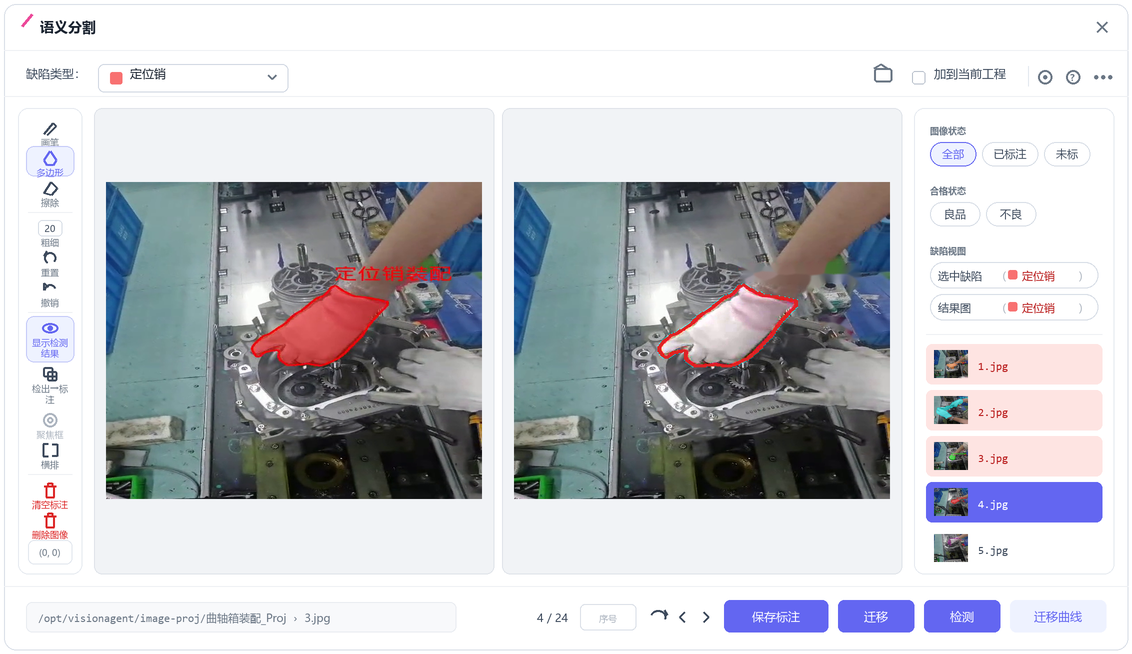
Glove colour and tools change; the objects that must be confirmed do not. Matching the five steps already running in the video, the classes are:
| Class | What it covers in the frame |
|---|---|
| Timing chain | Chain and related action region during timing-chain fit |
| Right case | The case half being lifted and seated at close-up |
| Oil-pump gear | The gear body as it enters the cavity |
| Locating pin | The pin and its seating region |
| Oil pump | Pump body / install form checked at confirmation |
Swatches are platform mask colours for class separation — not the glove colours on the line.
Setup stays light: cut 1–10 frames per class, outline them, hit “migrate” to train from labelled samples — a model in minutes; hit “detect” to re-check the same set. Glove changes or small angle shifts take a few more samples to iterate — no long on-site retraining residency.
Event detection: turn “seen” into “done”
Segmentation says what is in the frame; events say which step happened. This layer does not touch the model — only judgement logic.
Each of the five steps has one event, usually an “object exists” primitive on that class in the critical region; stricter area or AND gates can be added without retraining:
| Event | Meaning | Primary class |
|---|---|---|
E0 | Timing-chain fit done | Timing chain |
E1 | Right-case close done | Right case |
E2 | Oil-pump gear fit done | Oil-pump gear |
E3 | Locating-pin fit done | Locating pin |
E4 | Oil-pump confirmation done | Oil pump |
Events only answer whether a step’s conditions hold; they do not track progress — order belongs to the state machine next. Insert a process step later with one new event and one transition; the segmentation model can stay put.
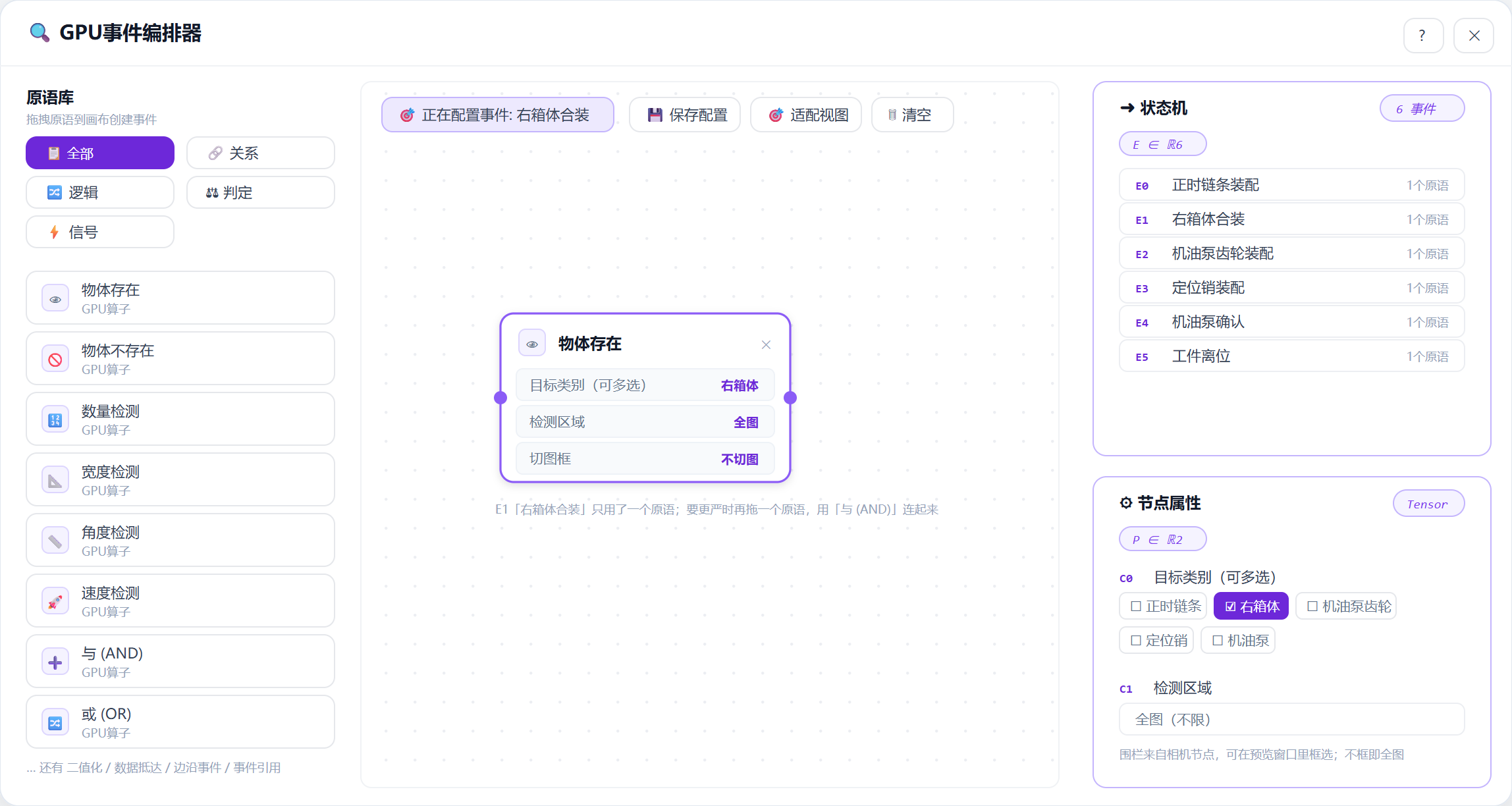
E1 right-case close: “object exists” on the right-case class; horizontal port wiring, no arrowheads.State machine: miss one step, no release
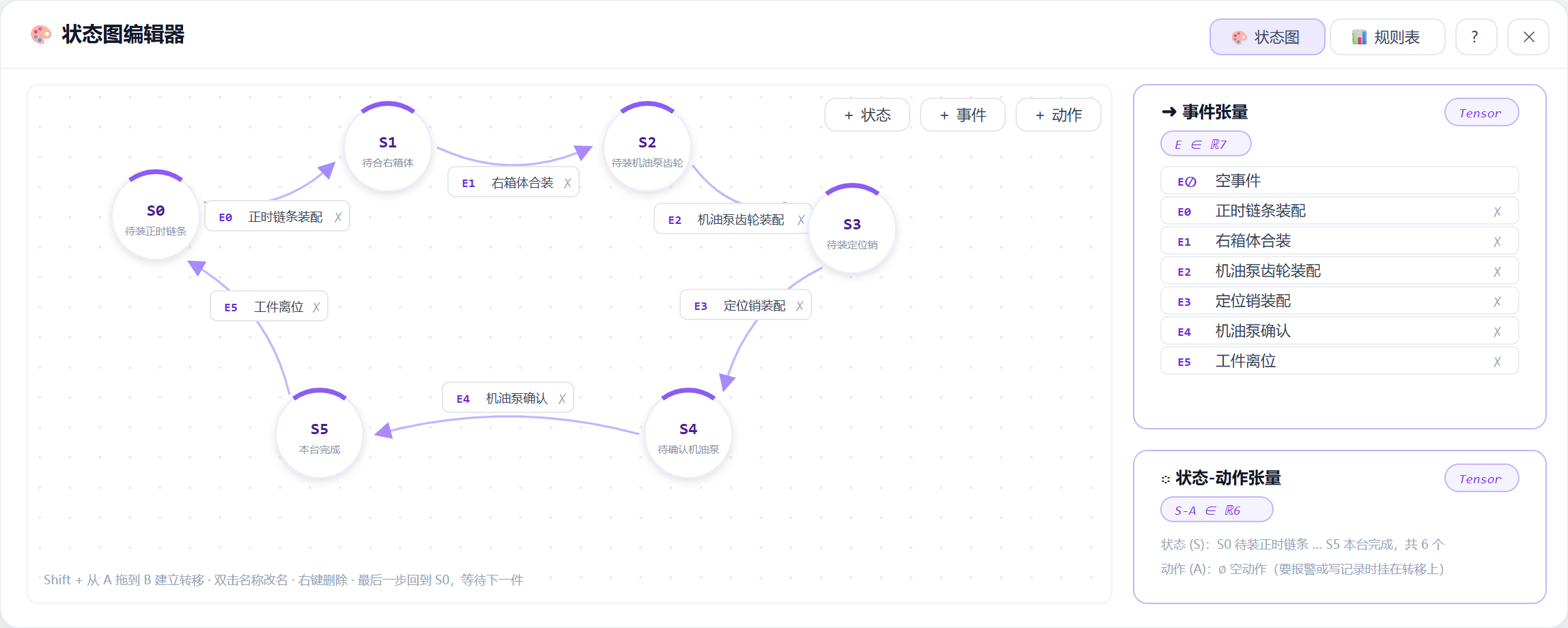
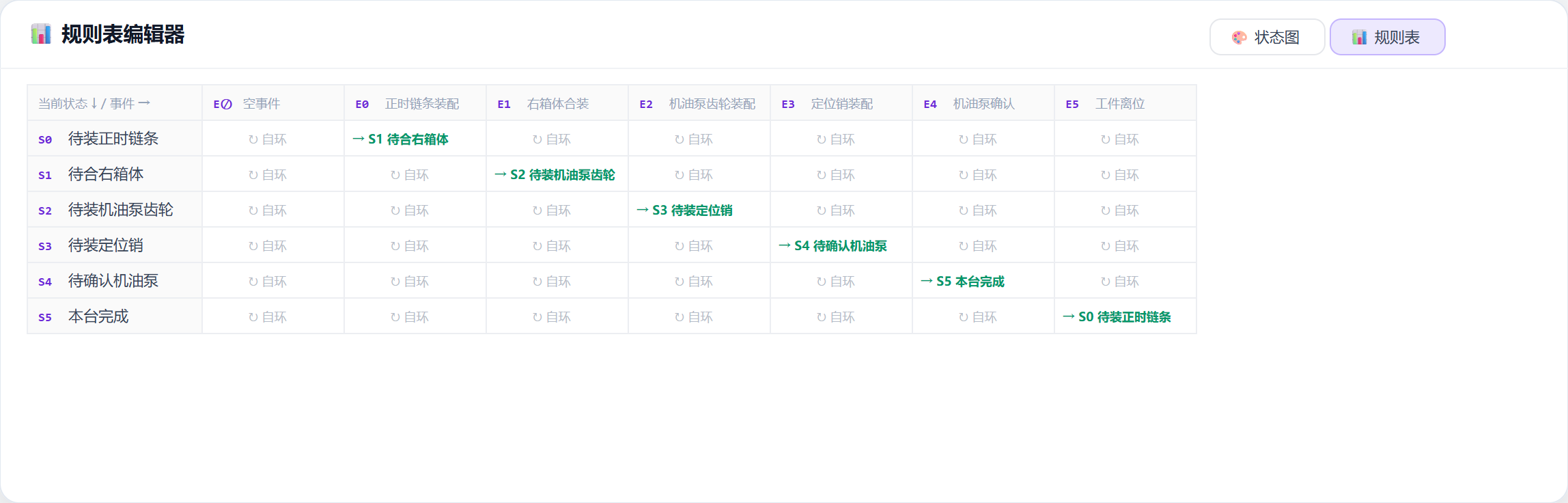
Events say whether a step holds; the state machine says where this unit is. This station advances in SOP order — a single chain.
The force is in the self-loop: in S2, fitting the pin first will not advance even if E3 fires — only the expected event moves the machine. Miss any step and S5 is unreachable; the station shows progress stuck on the missing link.
For a model change or a small sequence tweak, edit the graph and event list; the segmentation model can stay — rename classes or add a few samples.
Live run: 35 seconds of field video
The clip below is the live station (portrait, overhead). Coloured masks track the active step region and overlay the step name.
One detail: mask colour switches with the step — no need to read a report; the highlighted class is what the system believes is running. Wherever progress stops is the missing step.
Retrospective: where this approach stops
Ordered stations need more than kit counting
Kit counting fits order-free connector work; for crankcase internals, order itself is a quality constraint. Pin expected events in the state machine and skips are blocked by design.
Split class, event and state so changeovers stay light
“What is being fitted”, “does that count as done”, and “where are we” stay independent. Insert a step or tweak sequence — often config only, no model retrain. Field feedback can keep iterating the same few-shot loop.
One agent, many stations
Compute sits on the edge agent; stations keep camera and HMI. One box can run many stations and lines, each with its own classes, events and state machine.
Say the boundary clearly
Fits overhead-visible work with a short clear window: chain, case close, gear, pin, pump confirm. Not for steps fully hidden by fixtures with no visible outline — add a close-up camera or leave a process window.
Cross-domain reuse
The same base moves to another scene with 1–10 sample images and minutes of setup. Directions already run:
Four questions run through the project: what the system watches, what counts as done, which order is legal, and how results are kept. Answer them in the config UI and the station runs.
Split crankcase assembly into see → done → advance in order — miss or skip a step, and release never comes.